Actito
Actito is a SaaS customer-engagement platform that centralizes customer data and automates personalized marketing campaigns across channels like email, SMS, or web.
Data integration: Skyvia supports importing data to and from Actito, exporting Actito data to CSV files, replicating Actito data to relational databases, and synchronizing Actito data with other cloud apps and relational databases.
Backup: Skyvia Backup does not support Actito backup.
Query: Skyvia Query supports Actito.
Establishing Connection
To create a connection to Actito, obtain the Environment, API Key, and Entity Name.
Getting Credentials
Environment
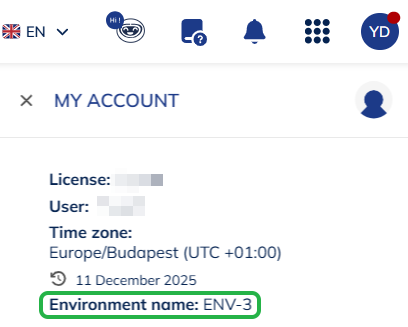
To get your Environment name:
-
Sign in to your Actito workspace.
-
Click on the user icon in the top right corner.
-
The Environment name will be displayed in the opened menu.
API Key
To generate an API Key:
-
Sign in to your Actito workspace.
-
Click on the user icon in the top right corner and select License Configuration.
-
Navigate to API accesses.
-
Click Create an API access.
-
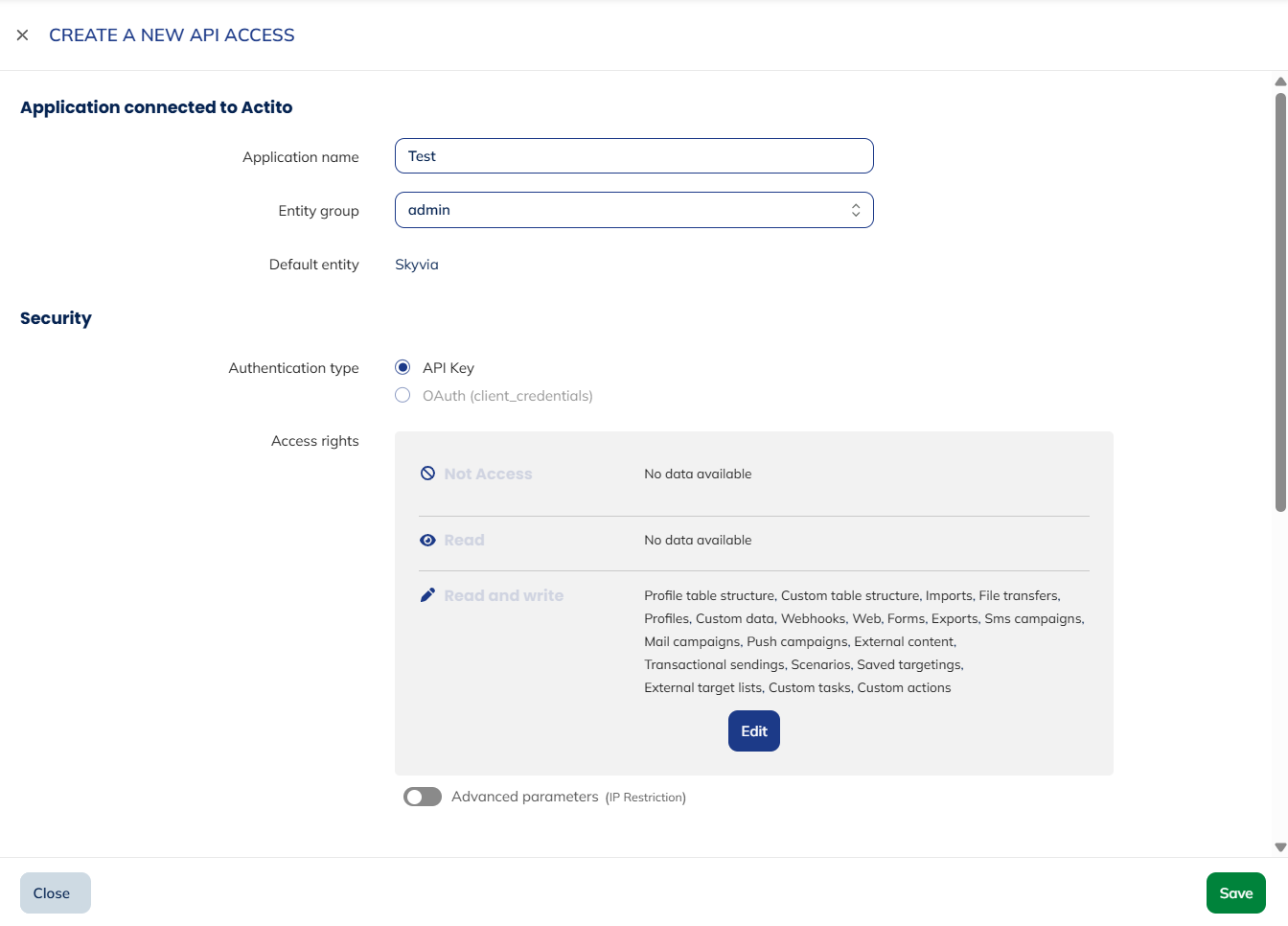
On the Create an API Access page, fill in the required fields:
- Application name: Enter any name
- Entity group: Select admin (for access to all entities) or a specific entity
- Authentication type: Select API Key
- Access rights: Select Read/Write for all entities
-
Click Save.
-
In the Manage API accesses list, select the newly created API access.
-
Click View API credentials at the top.
-
Copy the displayed API Key.
Creating Connection
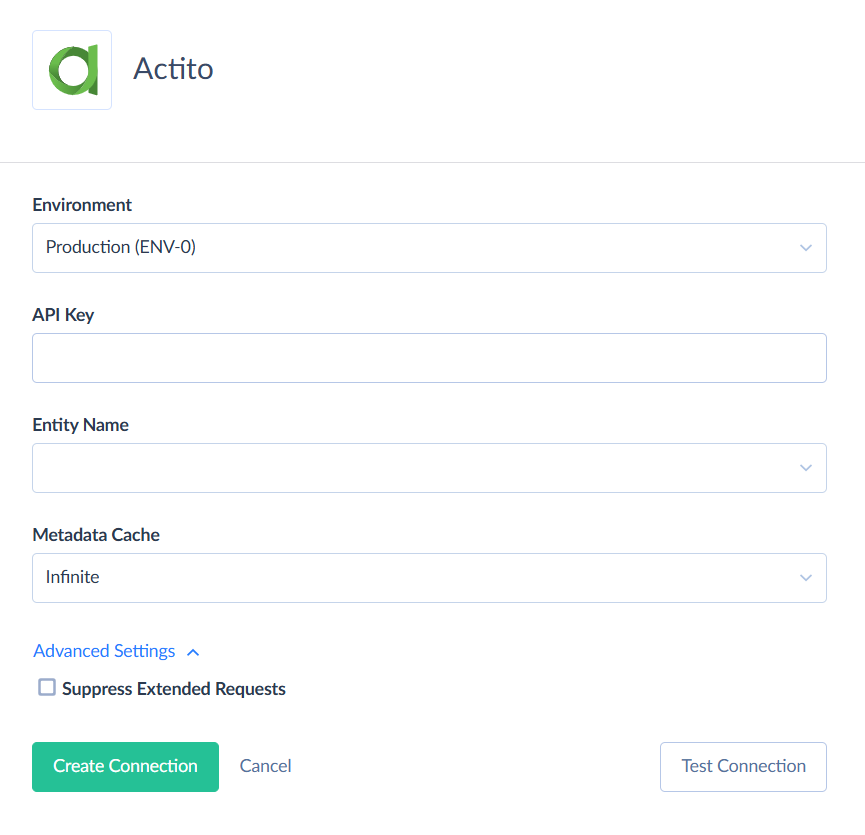
To connect to Actito, select the Environment, Entity Name and enter the API Key.
Additional Connection Parameters
Suppress Extended Requests
For the EmailCampaigns, EmailCampaignTemplates, and SMSCampaigns objects, Actito API returns only part of the fields when querying multiple records. To query values of additional fields, Skyvia performs additional extended requests. Such API requests can be performed for each record of such object. However, this can decrease performance and significantly increase the number of API calls used.
To reduce the number of API calls, select the Suppress Extended Requests checkbox.
Metadata Cache
You can specify the period after which Metadata cache is considered expired.
Connector Specifics
Filtering Specifics
Actito supports native filters for the following objects. Use these filters to improve performance and save API calls.
| Object | Operator | Fields |
|---|---|---|
| EmailCampaigns, EmailCampaignsExtended | = |
Id, SendingMode, ProfileTableId, Status, TemplateId |
=, IN |
Id, TemplateId | |
=, <, <=, >, >= |
CreatedAt, UpdatedAt | |
| EmailCampaignGroups | = |
Id, ProfileTableId, SendingMode |
=, <, <=, >, >= |
CreatedAt, UpdatedAt | |
| EmailCampaignTemplates | = |
Id, ProfileTableId, Type |
=, <, <=, >, >= |
CreatedAt, UpdatedAt | |
| EmailCampaignResults | = |
Status |
IN |
CampaignId | |
| EmailInteractions | = |
CampaignId, ProfileId, Status |
=, <, <=, >, >= |
OpeningMoment, UnsubscribedMoment | |
| SMSCampaigns | = |
Id |
| SMSInteractions | = |
CampaignId, ProfileId, Status |
| PushIntegrations, Exports, ETLs | =, <, <=, >, >= |
CreatedAt, UpdatedAt |
| Exports | = |
Id |
| Webhooks | = |
Id, On, OnElementId, EventType, IsActive |
| Goals | = |
Id, Type, Status |
| ETLs | = |
Id, Type |
| ETLExecutions | = |
Id, Type, Status, ETLId |
| Forms | = |
Id, ProfileTableName |
| FormParticipations | = |
FormId, ProfileId |
| FileTransferConfigurations | = |
Id, ConnectionServerType |
| FileLocations | = |
Id, ConfigurationId |
| FileLocationTestRequests | = |
Id, ConfigurationId, LocationId |
=, <, <=, >, >= |
CreatedAt, UpdatedAt | |
| FileSynchronizations | = |
Id, Name, LocationRemoteLocationId |
=, <, <=, >, >= |
CreatedAt, UpdatedAt | |
| FileSynchronizationRetrievals | = |
Id, SynchronizationId, Status |
=, <, <=, >, >= |
CreatedAt, UpdatedAt | |
| ContentLibraries | = |
Id |
=, <, <=, >, >= |
CreatedAt, UpdatedAt | |
| Contents | = |
Id, LibraryId, Label |
=, <, <=, >, >= |
CreatedAt, UpdatedAt | |
| Targetings | = |
Id, ProfileTableId |
=, <, <=, >, >= |
CreatedAt, UpdatedAt | |
| ExternalTargetLists | = |
Id, FeedingFileSynchronizationId |
=, <, <=, >, >= |
CreatedAt, UpdatedAt | |
| CustomTasks, CustomActions, ProfileTables, CustomTables | = |
Id |
| CustomActions | = |
ProfileTableId |
| <Profile Object> | = |
Id |
=, <, <=, >, >= |
CreatedAt, UpdatedAt | |
| <Profile Object>_Scenarios | = |
IsStartEventTriggered, IsActive |
| <Profile Object>_Interactions | = |
ProfileId, Type |
=, <, <=, >, >= |
CreatedAt | |
| <Profile Object>_SubscriptionInteractions | = |
ProfileId |
=, <, <=, >, >= |
CreatedAt | |
| <Custom Object> | = |
<Primary Key> |
You can use filters with other fields or operators, but it may increase API call usage.
DML Operations Support
Skyvia supports DML operations for such Actito objects:
| Operation | Object |
|---|---|
| INSERT, UPDATE, DELETE | EmailCampaigns, EmailCampaignsExtended, SMSCampaigns, <Profile Object>, <Custom Object> |
| INSERT | EmailCampaignGroups |
Incremental Replication and Synchronization
Skyvia supports Replication with Incremental Updates for objects that have UpdatedAt or CreatedAt fields. Objects with only CreatedAt replicate new records only, while objects with UpdatedAt replicate both new and changed records.
Skyvia supports Synchronization for objects that support both INSERT and UPDATE operations.
Supported Actions
Skyvia supports all the common actions for Actito.