Google Gemini
Gemini is a generative artificial intelligence (AI) assistant that helps users with writing, planning, brainstorming, and more.
Data integration: Skyvia supports the Gemini connector in the Lookup component of Data Flow and the Action component of Control Flow.
Backup: Skyvia Backup does not support Gemini backup.
Query: Skyvia Query does not support Gemini.
Establishing Connection
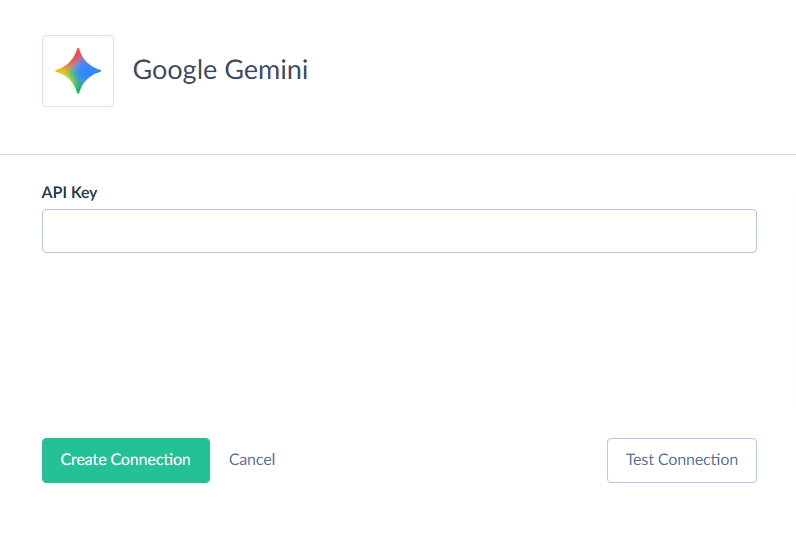
To create a connection to Gemini, enter the API Key.
Getting Credentials
To obtain the API Key, perform the following steps:
-
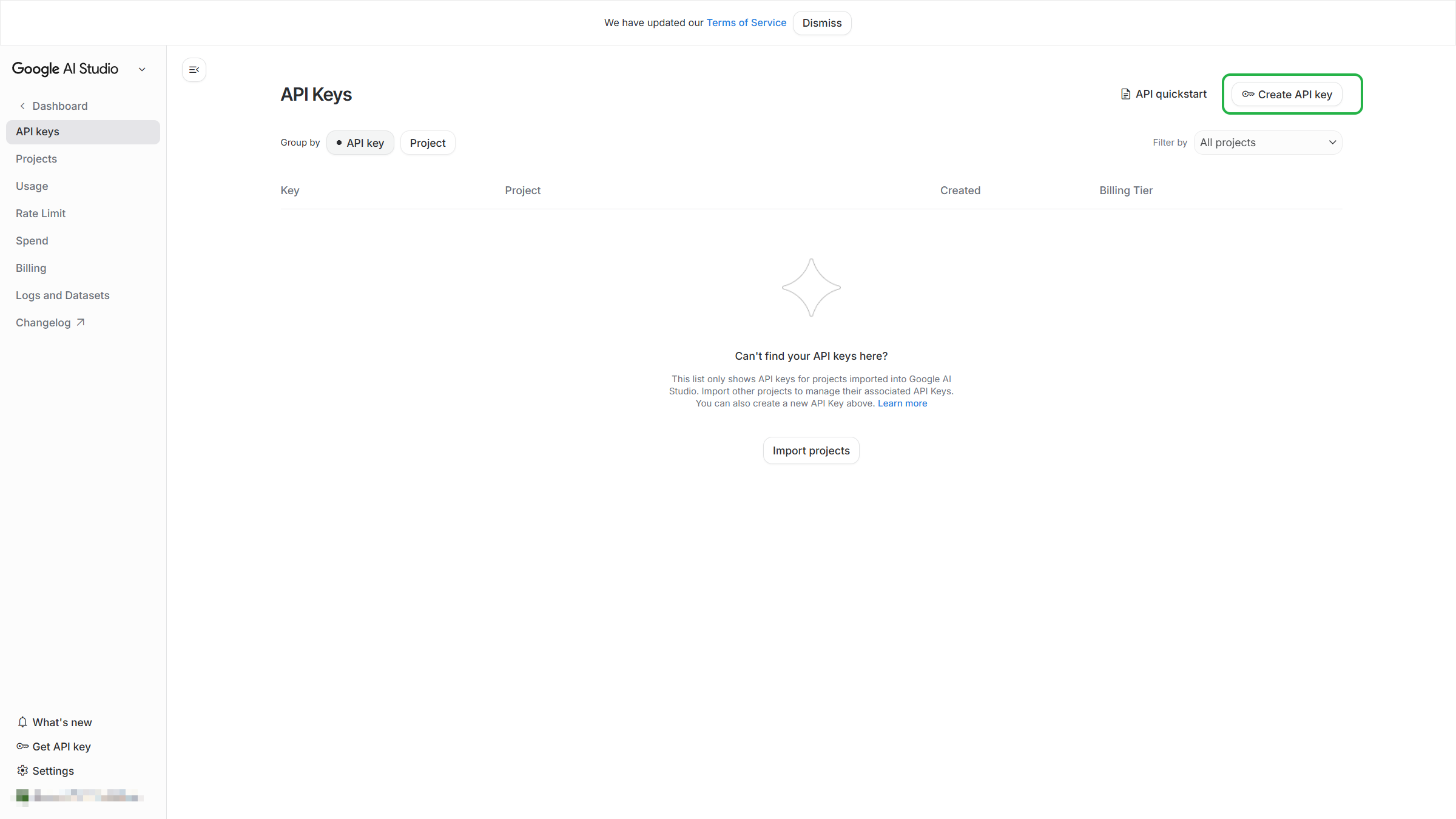
Sign in to your Gemini account and go to the Gemini API Key settings at https://aistudio.google.com/api-keys.
-
Click Create API key on the top right.
-
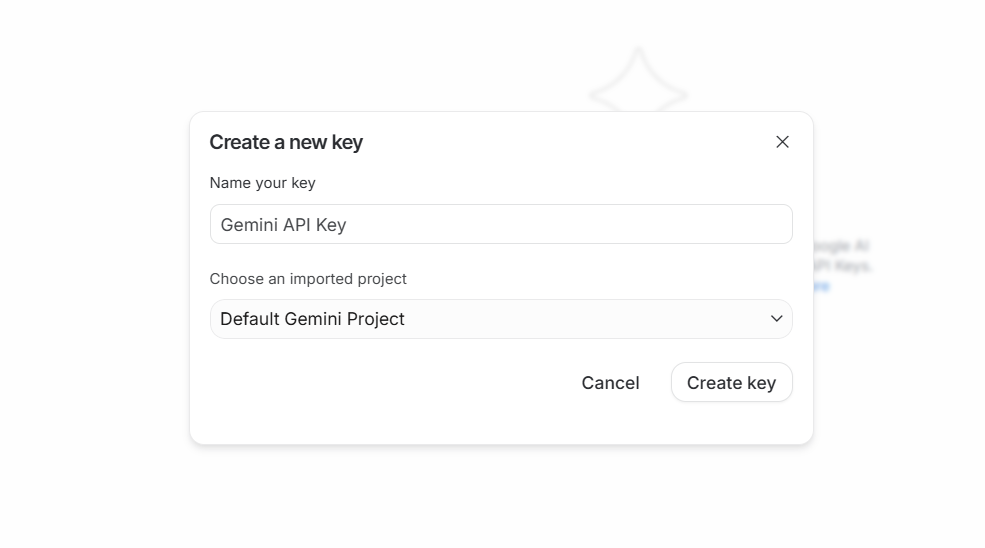
Name the API key and select the project to which it is related.
-
Copy the created API key.
Creating Connection
To connect to Gemini, enter your API Key.
Connector Specifics
The Gemini connector is read-only. It provides access to the Gemini API that allows you to send prompts and obtain results from AI models. You can use them via different actions and stored procedures that you can call in the Execute Command action.
Object Peculiarities
Files
The Files object is designed to retrieve and store information on uploaded files, specifically the file URL. You can reuse file URLs when interacting with Gemini models. For example, in requests where the file size exceeds 20 MB.
You can add records to this object using the UploadFile procedure or by executing procedures that involve inserting binary values larger than 20 MB.
CachedContents
Use this object to manage cached content, including both text and files. It allows you to retrieve a cache identifier (Id), which can be passed in subsequent requests instead of the full cache content.
It is useful when you need to provide the same large prompt or document to a model. You can add records to this object using the procedures: CacheTextContent, CacheFileByUrlContent, CacheFileContent.
Stored Procedures
Skyvia supports the following stored procedures for the Gemini connector.
GenerateResponse
To generate text responses from Gemini models based on prompt or global instructions, with the highest priority, use the command below. See more information here.
call GenerateResponse(:Model, :Prompt, :Instructions, :Temperature, :TopP, :TopK, :Seed, :MaxOutputTokens, :StopSequences, :SafetyCategory, :SafetyThreshold, :CachedContent)
| PARAMETER NAME | DESCRIPTION |
|---|---|
| Model | String, required. The name of the Model to use for generating the completion. |
| Prompt | String, required. The user-provided text to be processed by the Model. |
| Instructions | String, optional. Instructions for the Model. |
| Temperature | Double, optional. Controls the randomness of the output. The default value varies by Model. Values can range from [0.0, 2.0] |
| TopP | Double, optional.The maximum cumulative probability of tokens to consider when sampling. |
| TopK | Int64, optional.The maximum number of tokens to consider when sampling. |
| Seed | Int64, optional.Seed used in decoding. If not set, the request uses a randomly generated seed. |
| MaxOutputTokens | Int64, optional.The maximum number of tokens to include in a response candidate. |
| StopSequences | String, optional. The set of character sequences (up to 5) that will stop output generation. If specified, the API will stop at the first appearance of a stop_sequence. The stop sequence will not be included as part of the response. |
| SafetyCategory | Enum, optional. The safety category to configure a threshold for. Valid values are: HARM_CATEGORY_SEXUALLY_EXPLICIT,HARM_CATEGORY_HATE_SPEECH, HARM_CATEGORY_HARASSMENT, HARM_CATEGORY_DANGEROUS_CONTENT. |
| SafetyThreshold | Enum, optional. The safety threshold to configure for the safety category. Valid values are: BLOCK_LOW_AND_ABOVE, BLOCK_MEDIUM_AND_ABOVE, BLOCK_HIGH_AND_ABOVE, BLOCK_NONE. |
| CachedContent | String, optional. The name of the content cached to use as context to serve the prediction. Format: cachedContents/{cachedContent}. |
GetEmbeddings
To generate a text embedding vector from the input content use the command below. See more information here.
call GetEmbeddings(:Model, :Input, :TaskType, :Title, :OutputDimensionality)
| PARAMETER NAME | DESCRIPTION |
|---|---|
| Model | String, required. The Model's resource name. This serves as an ID for the Model to use. |
| Input | String, required. The text to embed. |
| TaskType | Enum, optional. The task type for which the embeddings will be used. Valid values are: TASK_TYPE_UNSPECIFIED, RETRIEVAL_QUERY, RETRIEVAL_DOCUMENT, SEMANTIC_SIMILARITY, CLASSIFICATION, CLUSTERING, QUESTION_ANSWERING, FACT_VERIFICATION, CODE_RETRIEVAL_QUERY. |
| Title | String, optional. An optional title for the text. Only applicable when TaskType is RETRIEVAL_DOCUMENT. |
| OutputDimensionality | Int64, optional. Optional reduced dimension for the output embedding. If set, excessive values in the output embedding are truncated from the end. |
UploadFile
To upload a file to Gemini and return metadata (including URL/identifiers), which then become available in the Files object, use the command:
call UploadFile(:FileName, :BinaryContent, :MimeType)
| PARAMETER NAME | DESCRIPTION |
|---|---|
| FileName | String, optional. The name of the file to be uploaded. |
| BinaryContent | Binary, required. The binary content of the file to be uploaded. |
| MimeType | Enum, optional. The MIME type of the file to be uploaded. |
AnalyzeFile
To analyze a file with an AI model, use the command:
call AnalyzeFile(:Model, :Prompt, :BinaryContent, :MimeType, :Instructions, :Temperature, :TopP, :TopK, :Seed, :MaxOutputTokens, :StopSequences, :SafetyCategory, :SafetyThreshold, :CachedContent)
| PARAMETER NAME | DESCRIPTION |
|---|---|
| Model | String, required. The Model's resource name. This serves as an ID for the Model to use. |
| Prompt | String, required. The user-provided text to be processed by the Model. |
| BinaryContent | Binary, required. The binary content of the file to be analyzed. |
| MimeType | Enum, required. The MIME type of the file to be analyzed. |
| Instructions | String, optional. Instructions for the Model. |
| Temperature | Double, optional. Controls the randomness of the output. The default value varies by Model. Values can range from [0.0, 2.0] |
| TopP | Double, optional.The maximum cumulative probability of tokens to consider when sampling. |
| TopK | Int64, optional.The maximum number of tokens to consider when sampling. |
| Seed | Int64, optional.Seed used in decoding. If not set, the request uses a randomly generated seed. |
| MaxOutputTokens | Int64, optional.The maximum number of tokens to include in a response candidate. |
| StopSequences | String, optional. The set of character sequences (up to 5) that will stop output generation. If specified, the API will stop at the first appearance of a stop_sequence. The stop sequence will not be included as part of the response. |
| SafetyCategory | Enum, optional. The safety category to configure a threshold for. Valid values are: HARM_CATEGORY_SEXUALLY_EXPLICIT,HARM_CATEGORY_HATE_SPEECH, HARM_CATEGORY_HARASSMENT, HARM_CATEGORY_DANGEROUS_CONTENT. |
| SafetyThreshold | Enum, optional. The safety threshold to configure for the safety category. Valid values are: BLOCK_LOW_AND_ABOVE, BLOCK_MEDIUM_AND_ABOVE, BLOCK_HIGH_AND_ABOVE, BLOCK_NONE. |
| CachedContent | String, optional. The name of the content cached to use as context to serve the prediction. Format: cachedContents/{cachedContent}. To analyze a large cached file use the GenerateResponse procedure, specifying the Id in the CachedContent parameter. The CachedContent parameter in the AnalyzeFile procedure is designed for additional data or conditions to complement Prompt and Instructions. For example, suppose you need to analyze a file with video and match it with a text excerpt from a book. In this case, you should first upload the large text excerpt to the cache, and then specify its Id in the CachedContent field for the AnalyzeFile procedure. |
AnalyzeFileByUrl
To analyze a file with an AI model by the file URL, use the command:
call AnalyzeFileByUrl(:Model, :Prompt, :FileUrl, :MimeType, :Instructions, :Temperature, :TopP, :TopK, :Seed, :MaxOutputTokens, :StopSequences, :SafetyCategory, :SafetyThreshold, :CachedContent)
| PARAMETER NAME | DESCRIPTION |
|---|---|
| Model | String, required. The Model's resource name. This serves as an ID for the Model to use. |
| Prompt | String, required. The user-provided text to be processed by the Model. |
| FileUrl | String, required. The URL of the file to be analyzed. |
| MimeType | Enum, required. The MIME type of the file to be analyzed. |
| Instructions | String, optional. Instructions for the Model. |
| Temperature | Double, optional. Controls the randomness of the output. The default value varies by Model. Values can range from [0.0, 2.0] |
| TopP | Double, optional.The maximum cumulative probability of tokens to consider when sampling. |
| TopK | Int64, optional.The maximum number of tokens to consider when sampling. |
| Seed | Int64, optional.Seed used in decoding. If not set, the request uses a randomly generated seed. |
| MaxOutputTokens | Int64, optional.The maximum number of tokens to include in a response candidate. |
| StopSequences | String, optional.The set of character sequences (up to 5) that will stop output generation. If specified, the API will stop at the first appearance of a stop_sequence. The stop sequence will not be included as part of the response. |
| SafetyCategory | Enum, optional. The safety category to configure a threshold for. Valid values are: HARM_CATEGORY_SEXUALLY_EXPLICIT,HARM_CATEGORY_HATE_SPEECH, HARM_CATEGORY_HARASSMENT, HARM_CATEGORY_DANGEROUS_CONTENT. |
| SafetyThreshold | Enum, optional.The safety threshold to configure for the safety category. Valid values are: BLOCK_LOW_AND_ABOVE, BLOCK_MEDIUM_AND_ABOVE, BLOCK_HIGH_AND_ABOVE, BLOCK_NONE. |
| CachedContent | String, optional. The name of the content cached to use as context to serve the prediction. Format: cachedContents/{cachedContent}. |
GenerateImage
To generate an image based on the text input using image-generation (Nano Banana), use the command:
call GenerateImage(:Model, :Prompt, :AspectRatio, :ImageSize)
| PARAMETER NAME | DESCRIPTION |
|---|---|
| Model | String, required. The Model's resource name. This serves as an ID for the Model to use. |
| Prompt | String, required. The user-provided text to be processed by the Model. |
| AspectRatio | Enum, optional. The aspect ratio of the generated image. |
| ImageSize | Enum, optional. The size of the generated image. |
EditImage
This command edits an existing image with an AI model based on the provided instructions.
call EditImage(:Model, :Prompt, :BinaryContent, :MimeType, :AspectRatio, :ImageSize)
| PARAMETER NAME | DESCRIPTION |
|---|---|
| Model | String, required. The Model's resource name. This serves as an ID for the Model to use. |
| Prompt | String, required. The user-provided text to be processed by the Model. |
| BinaryContent | Binary, required. The binary content of the image to be edited. |
| MimeType | Enum, required. The MIME type of the image to be edited. |
| AspectRatio | Enum, optional. The aspect ratio of the edited image. |
| ImageSize | Enum, optional. The size of the edited image. |
EditImageByUrl
This action edits an existing image by URL with an AI model based on the provided instructions.
call EditImageByUrl(:Model, :Prompt, :ImageUrl, :MimeType, :AspectRatio, :ImageSize)
| PARAMETER NAME | DESCRIPTION |
|---|---|
| Model | String, required. The Model's resource name. This serves as an ID for the Model to use. |
| Prompt | String, required. The user-provided text to process by the Model. |
| ImageUrl | String, required. The URL of the image to edit. |
| MimeType | Enum, required. The MIME type of the image to edit. |
| AspectRatio | Enum, optional. The aspect ratio of the edited image. |
| ImageSize | Enum, optional. The size of the edited image. |
GenerateAudio
To generate an audio file for the specified input text with an AI model, use the command:
call GenerateAudio(:Model, :Prompt, :Voice, :Temperature, :TopP, :TopK, :Seed, :MaxOutputTokens)
| PARAMETER NAME | DESCRIPTION |
|---|---|
| Model | String, required. The Model's resource name. This serves as an ID for the Model to use. |
| Prompt | String, required. The user-provided text to be processed by the Model. |
| Voice | Enum, required. The voice to use for generating the audio. |
| Temperature | Double, optional. Controls the randomness of the output. The default value varies by Model. Values can range from [0.0, 2.0] |
| TopP | Double, optional. The maximum cumulative probability of tokens to consider when sampling. |
| TopK | Int64, optional. The maximum number of tokens to consider when sampling. |
| Seed | Int64, optional. Seed used in decoding. If not set, the request uses a randomly generated seed. |
| MaxOutputTokens | Int64, optional. The maximum number of tokens to include in a response candidate. |
GenerateVideo
To generate a video based on the text input using video-generation (Veo), use the command:
call GenerateVideo(:Model, :Prompt, :NegativePrompt, :AspectRatio, :Resolution, :DurationSeconds)
| PARAMETER NAME | DESCRIPTION |
|---|---|
| Model | String, required. The Model's resource name. This serves as an ID for the Model to use. |
| Prompt | String, required. The user-provided text to be processed by the Model. |
| NegativePrompt | String, optional. The user-provided text to be excluded from the generated video. |
| AspectRatio | Enum, optional. The aspect ratio of the generated video. |
| Resolution | Enum, optional. The resolution of the generated video. |
| DurationSeconds | Int64, optional. The duration of the generated video in seconds. |
CacheTextContent
The following command caches the content to reuse the same text in subsequent requests to the Model without re-transmitting the entire content:
call CacheTextContent(:Model, :Content, :ExpireTime, :Instructions, :DisplayName)
| PARAMETER NAME | DESCRIPTION |
|---|---|
| Model | String, required. The Model's resource name. This serves as an ID for the Model to use. |
| Content | String, required. The user-provided text to be processed by the Model. |
| ExpireTime | DateTime, required. The cache expiration time |
| Instructions | String, optional. Instructions for using the cached content. |
| DisplayName | String, optional. A display name for the cached content. |
CacheFileContent
The following command creates a context cache based on a binary file with the specified MimeType to use in subsequent requests:
call CacheFileContent(:Model, :BinaryContent, :MimeType, :ExpireTime, :Instructions, :DisplayName)
| PARAMETER NAME | DESCRIPTION |
|---|---|
| Model | String, required. The Model's resource name. This serves as an ID for the Model to use. |
| BinaryContent | Binary, required. The binary content of the file to cache. |
| MimeType | Enum, required. The MIME type of the file to cache. |
| ExpireTime | DateTime, required. The cache expiration time |
| Instructions | String, optional. Instructions for using the cached content. |
| DisplayName | String, optional. A display name for the cached content. |
CacheFileContentByUrl
This command creates a context cache based on a URI/URL of a previously uploaded file, without transferring binary data:
call CacheFileContentByUrl(:Model, :FileUrl, :MimeType, :ExpireTime, :Instructions, :DisplayName)
| PARAMETER NAME | DESCRIPTION |
|---|---|
| Model | String, required. The Model's resource name. This serves as an ID for the Model to use. |
| FileUrl | String, required. The internal URI from the Files object. |
| MimeType | Enum, required. The MIME type of the file to cache. |
| ExpireTime | DateTime, required. The cache expiration time |
| Instructions | String, optional. Instructions for using the cached content. |
| DisplayName | String, optional. A display name for the cached content. |
Supported Actions
Skyvia supports the standard Execute Command action for Gemini, as well as the following custom actions: