UpdateCustomAttributesOfCustomer
This action updates custom fields and their values in an existing record in the Customers object.
Action Parameters
| PARAMETER NAME | DESCRIPTION |
|---|---|
| CustomerUuid | The ChartMogul UUID of the customer whose custom fields you want to update. |
| Custom | Existing field name and its new value in the {"key":"value"} format. |
Result
The custom fields of the specified customer record are updated.
Example
You configure this action in the same way wherever you use it — in the Target component of Data Flow or in the Action component of an Automation flow.
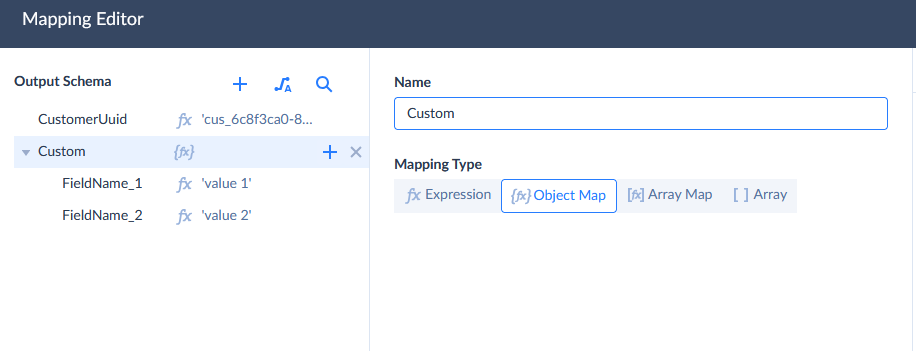
The Custom parameter must contain the names of the custom fields that already exist for the customer and their new values. To map it, click  next to Parameters to open Mapping Editor and do the following:
- Select the Custom parameter in Output Schema and set its Mapping Type to Object Map.
- Click + next to Custom to add a nested property for each custom field you want to update, and name each property after the corresponding custom field in ChartMogul.
- Map every nested property to its new value.
Was this page helpful?