SQLiteDemoProvider
SQLiteDemoProvider is a demo SDK connector provider that works with a local SQLite database. It demonstrates basic SDK connector features - reading data, looking for records, inserting, updating, and deleting data. It uses the sample database sdkdemo.db, having a predefined structure with a single Products table, and the demo provider offers methods to work only with this table. The provider creates and fills this table when calling the Init method, and the database is also created automatically if not present.
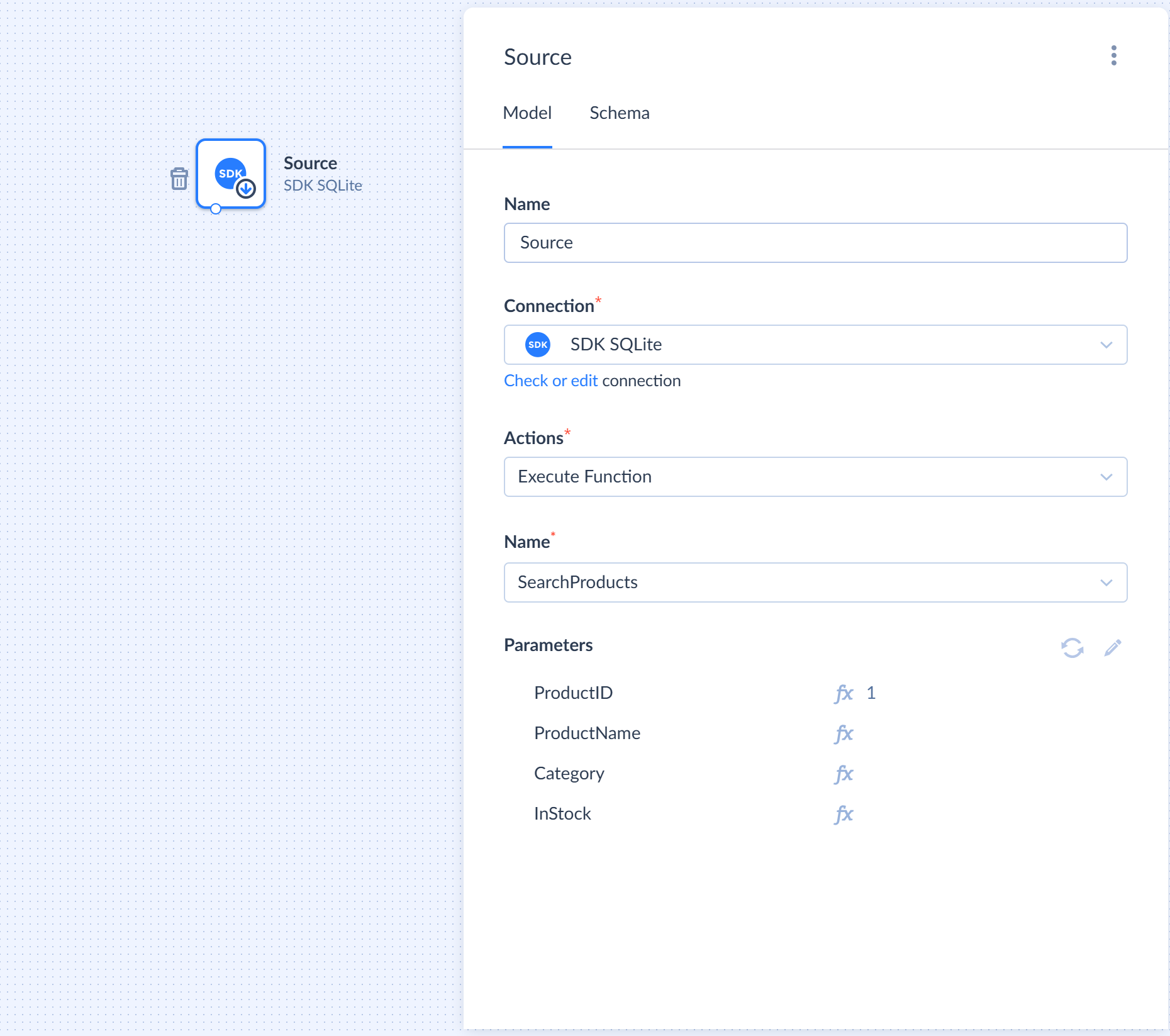
1
2
3
4
5
6
7
8
9
10
11
12
13
14
15
16
17
18
19
20
21
22
23
24
25
26
27
28
29
30
31
32
33
34
35
36
37
38
39
40
41
42
43
44
45
46
47
48
49
50
51
52
53
54
55
56
57
58
59
60
61
62
63
64
65
66
67
68
69
70
71
72
73
74
75
76
77
78
79
80
81
82
83
84
85
86
87
88
89
90
91
92
93
94
95
96
97
98
99
100
101
102
103
104
105
106
107
108
109
110
111
112
113
114
115
116
117
118
119
120
121
122
123
124
125
126
127
128
129
130
131
132
133
134
135
136
137
138
139
140
141
142
143
144
145
146
147
148
149
150
151
152
153
154
155
156
157
158
159
160
161
162
163
164
165
166
167
168
169
170
171
172
173
174
175
176
177
178
179
180
181
182
183
184
185
186
187
188
189
190
191
192
193
194
195
196
197
198
199
200
201
202
203
204
205
206
207
208
209
210
211
212
213
214
215
216
217
218
219
220
221
222
223
224
225
226
227
228
229
230
231
232
233
234
235
236
237
238
239
240
241
242
243
244
245
246
247
248
249
250
251
252
253
254
255
256
257
258
259
260
261
262
263
264
265
266
267
268
269
270
271
272
273
274
275
276
277
278
279
280
281
282
283
284
285
286
287
288
289
290
291
292
293
294
295
296
297
298
299
300
301
302
303
304
305
306
307
308
309
310
311
312
313
314
315
316
317
318
319
320
321
322
323
324
325
326
327
328
329
330
331
332
333
334
335
336
337
338
339
340
341
342
343
344
345
346
347
348
349
350
351
352
353
354
355
356
357
358
359
360
361
362
363
364
365
366
367
368
369
370
371
372
373
374
375
376
377
378
379
380
381
382
383
384
385
386
387
388
389
390
391
392
393
394
395
396
397
398
399
400
401
402
403
404
405
406
407
408
409
410
411
412
413
414
415
416
417
418
419
420
421
422
423
424
425
426
427
428
429
430
431
432
433
434
435
436
437
438
439
440
441
442
443
444
445
446
447
448
449
450
451
452
453
454
455
456
457
458
459
460
461
462
463
464
465
466
467
468
469
470
471
472
473
474
475
476
477
478
479
480
481
482
483
484
485
486
487
488
489
490
491
492
493
494
495
496
497
498
499
500
501
502
503
504
505
506
507
508
509
510
511
512
513
514
515
516
517
518
519
520
521
522
523
524
525
526
527
528
529
530
531
532
533
534
535
536
537
538
539
540
541
542
543
544
545
using System;
using System.Collections.Generic;
using System.Threading;
using System.Threading.Tasks;
using Devart.Data.SQLite;
using Devart.Skyvia.Providers.SDK.Attributes;
namespace Devart.Skyvia.Providers.SDK.Demo {
/// <summary>
/// A demo provider for SQLite that manages product data locally.
/// </summary>
public class SQLiteDemoProvider : SDKProvider {
private SQLiteConnection connection;
private const string connectionString = "Data Source=sdkdemo.db;FailIfMissing=False";
public SQLiteDemoProvider() {
}
/// <summary>
/// Initializes the SQLite connection and opens the database file.
/// </summary>
public override async Task Init(CancellationToken cancellationToken) {
connection = new SQLiteConnection(connectionString);
await connection.OpenAsync(cancellationToken);
}
/// <summary>
/// Performs a lightweight connectivity check.
/// </summary>
protected override async Task Test(CancellationToken cancellationToken) {
using (var cmd = connection.CreateCommand()) {
cmd.CommandText = "SELECT 1";
await cmd.ExecuteNonQueryAsync(cancellationToken);
}
}
/// <summary>
/// Closes the database connection and releases resources.
/// </summary>
public override void Dispose() {
if (connection != null) {
if (connection.State == System.Data.ConnectionState.Open)
connection.Close();
connection.Dispose();
connection = null;
}
}
/// <summary>
/// Creates the 'Products' table and populates it with sample data.
/// </summary>
[ProviderMethod(ProviderActionType.Action, "Init Data")]
public async Task InitData(CancellationToken cancellationToken) {
using (var cmd = connection.CreateCommand()) {
cmd.CommandText = @"
CREATE TABLE `Products` (
ProductID INTEGER PRIMARY KEY AUTOINCREMENT,
ProductName VARCHAR(100) NOT NULL,
Category VARCHAR(100) NOT NULL,
InStock BOOLEAN NOT NULL,
Price DOUBLE NOT NULL
);
INSERT INTO Products (ProductName, Category, InStock, Price) VALUES ('iPhone 15 Pro', 'Electronics', 1, 999.99);
INSERT INTO Products (ProductName, Category, InStock, Price) VALUES ('MacBook Air M2', 'Computers', 1, 1199.50);
INSERT INTO Products (ProductName, Category, InStock, Price) VALUES ('Sony WH-1000XM5 Headphones', 'Audio', 1, 348.00);
INSERT INTO Products (ProductName, Category, InStock, Price) VALUES ('Samsung 32-Inch 4K Monitor', 'Peripherals', 0, 449.25);
INSERT INTO Products (ProductName, Category, InStock, Price) VALUES ('Logitech MX Master 3S Mouse', 'Peripherals', 1, 99.00);
INSERT INTO Products (ProductName, Category, InStock, Price) VALUES ('Mechanical RGB Keyboard', 'Peripherals', 1, 159.99);
INSERT INTO Products (ProductName, Category, InStock, Price) VALUES ('Apple Watch Series 9', 'Gadgets', 1, 399.00);
INSERT INTO Products (ProductName, Category, InStock, Price) VALUES ('Samsung T7 Portable SSD 1TB', 'Storage', 0, 89.50);
INSERT INTO Products (ProductName, Category, InStock, Price) VALUES ('iPad Pro 11-inch', 'Electronics', 1, 799.00);
INSERT INTO Products (ProductName, Category, InStock, Price) VALUES ('Bose Bluetooth Speaker', 'Audio', 1, 129.00);";
await cmd.ExecuteNonQueryAsync(cancellationToken);
}
}
/// <summary>
/// Cleans up the demonstration environment by removing the 'Products' table.
/// </summary>
[ProviderMethod(ProviderActionType.Action, "Clear Data")]
public async Task ClearData(CancellationToken cancellationToken) {
try {
using (var cmd = connection.CreateCommand()) {
cmd.CommandText = "DROP TABLE `Products`";
await cmd.ExecuteNonQueryAsync(cancellationToken);
}
}
catch(SQLiteException ex) {
if (!ex.Message.Contains("no such table"))
throw;
}
}
/// <summary>
/// Retrieves the complete list of products from the data source.
/// </summary>
/// <remarks>
/// This method is compatible with Source components in DataFlow,
/// as well as Action components in ControlFlow or Automation.
/// </remarks>
[ProviderMethod(ProviderActionType.Source | ProviderActionType.Action)]
public async Task<IEnumerable<Product>> GetAllProducts(CancellationToken cancellationToken) {
List<Product> products = new List<Product>();
using (var cmd = connection.CreateCommand()) {
cmd.CommandText = "SELECT * FROM `Products`";
using (var rd = await cmd.ExecuteReaderAsync(cancellationToken)) {
while (await rd.ReadAsync(cancellationToken)) {
Product product = new Product();
product.ProductID = rd.GetInt64(rd.GetOrdinal("ProductID"));
product.ProductName = !rd.IsDBNull(rd.GetOrdinal("ProductName")) ? rd.GetString(rd.GetOrdinal("ProductName")) : null;
product.Category = !rd.IsDBNull(rd.GetOrdinal("Category")) ? rd.GetString(rd.GetOrdinal("Category")) : null;
product.InStock = !rd.IsDBNull(rd.GetOrdinal("InStock")) && rd.GetBoolean(rd.GetOrdinal("InStock"));
product.Price = !rd.IsDBNull(rd.GetOrdinal("Price")) ? rd.GetDouble(rd.GetOrdinal("Price")) : 0.0;
products.Add(product);
}
}
}
return products;
}
/// <summary>
/// Searches for products based on flexible criteria such as ID, name, category, or stock status.
/// </summary>
/// <remarks>
/// This method is compatible with Source and Lookup components in DataFlow,
/// as well as Action components in ControlFlow or Automation.
/// </remarks>
[ProviderMethod(ProviderActionType.Source | ProviderActionType.Lookup | ProviderActionType.Action)]
public async Task<IEnumerable<Product>> SearchProducts(SearchProductsRequest parameters, CancellationToken cancellationToken) {
List<Product> products = new List<Product>();
using (var cmd = connection.CreateCommand()) {
List<string> filters = new List<string>();
if (parameters.ProductID.HasValue) {
filters.Add("ProductID = :id");
cmd.Parameters.Add("id", SQLiteType.Int64).Value = parameters.ProductID.Value;
}
if (!string.IsNullOrEmpty(parameters.ProductName)) {
filters.Add("ProductName = :name");
cmd.Parameters.Add("name", SQLiteType.Text).Value = parameters.ProductName;
}
if (!string.IsNullOrEmpty(parameters.Category)) {
filters.Add("Category = :cat");
cmd.Parameters.Add("cat", SQLiteType.Text).Value = parameters.Category;
}
if (parameters.InStock.HasValue) {
filters.Add("InStock = :stock");
cmd.Parameters.Add("stock", SQLiteType.Int32).Value = parameters.InStock.Value ? 1 : 0;
}
string sql = "SELECT * FROM `Products`";
if (filters.Count > 0) {
sql += " WHERE " + string.Join(" AND ", filters);
}
cmd.CommandText = sql;
using (var rd = await cmd.ExecuteReaderAsync(cancellationToken)) {
while (await rd.ReadAsync(cancellationToken)) {
products.Add(new Product {
ProductID = rd.GetInt64(rd.GetOrdinal("ProductID")),
ProductName = !rd.IsDBNull(rd.GetOrdinal("ProductName")) ? rd.GetString(rd.GetOrdinal("ProductName")) : null,
Category = !rd.IsDBNull(rd.GetOrdinal("Category")) ? rd.GetString(rd.GetOrdinal("Category")) : null,
InStock = !rd.IsDBNull(rd.GetOrdinal("InStock")) && rd.GetBoolean(rd.GetOrdinal("InStock")),
Price = !rd.IsDBNull(rd.GetOrdinal("Price")) ? rd.GetDouble(rd.GetOrdinal("Price")) : 0.0
});
}
}
}
return products;
}
/// <summary>
/// Retrieves a single product by its unique identifier.
/// </summary>
/// <remarks>
/// This method is primarily used by Lookup components in DataFlow for data enrichment
/// and by Action components in ControlFlow or Automation for single-record retrieval.
/// </remarks>
[ProviderMethod(ProviderActionType.Lookup | ProviderActionType.Action)]
public async Task<Product> GetProduct(long parameters, CancellationToken cancellationToken) {
using (var cmd = connection.CreateCommand()) {
cmd.CommandText = "SELECT * FROM `Products` WHERE ProductID = :id";
cmd.Parameters.Add("id", SQLiteType.Int64).Value = parameters;
using (var rd = await cmd.ExecuteReaderAsync(cancellationToken)) {
if (await rd.ReadAsync(cancellationToken)) {
Product product = new Product();
product.ProductID = rd.GetInt64(rd.GetOrdinal("ProductID"));
product.ProductName = !rd.IsDBNull(rd.GetOrdinal("ProductName")) ? rd.GetString(rd.GetOrdinal("ProductName")) : null;
product.Category = !rd.IsDBNull(rd.GetOrdinal("Category")) ? rd.GetString(rd.GetOrdinal("Category")) : null;
product.InStock = !rd.IsDBNull(rd.GetOrdinal("InStock")) && rd.GetBoolean(rd.GetOrdinal("InStock"));
product.Price = !rd.IsDBNull(rd.GetOrdinal("Price")) ? rd.GetDouble(rd.GetOrdinal("Price")) : 0.0;
return product;
}
}
}
return null;
}
/// <summary>
/// Performs a batch insertion of products into the database.
/// </summary>
/// <remarks>
/// This method is designed for Target components in DataFlow.
/// The number and order of results strictly match the input parameters to provide per-row execution logging.
/// If an error occurs during the insertion of a specific row, the corresponding result object
/// will contain the error details in the <c>ErrorMessage</c> field, allowing the pipeline to continue
/// processing subsequent records.
/// </remarks>
[ProviderMethod(ProviderActionType.Target)]
public async Task<IEnumerable<TargetProductResult>> InsertProducts(IEnumerable<InsertProductParameter> parameters, CancellationToken cancellationToken) {
List<TargetProductResult> results = new List<TargetProductResult>();
foreach (var param in parameters) {
try {
using (var cmd = connection.CreateCommand()) {
cmd.CommandText = @"
INSERT INTO `Products` (ProductName, Category, InStock, Price)
VALUES (:name, :cat, :stock, :price);
SELECT last_insert_rowid();";
cmd.Parameters.Add("name", SQLiteType.Text).Value = param.ProductName;
cmd.Parameters.Add("cat", SQLiteType.Text).Value = param.Category;
cmd.Parameters.Add("stock", SQLiteType.Int32).Value = param.InStock ? 1 : 0;
cmd.Parameters.Add("price", SQLiteType.Double).Value = param.Price;
var id = (long)await cmd.ExecuteScalarAsync(cancellationToken);
results.Add(new TargetProductResult { ProductID = id });
}
}
catch (Exception ex) {
results.Add(new TargetProductResult {
ErrorMessage = $"Error inserting {param.ProductName}: {ex.Message}"
});
}
}
return results;
}
/// <summary>
/// Performs a batch update of existing products in the database.
/// </summary>
/// <remarks>
/// This method is designed for Target components in DataFlow.
/// The number and order of results strictly match the input parameters to provide per-row execution logging.
/// If an error occurs during the update of a specific row, the corresponding result object
/// will contain the error details in the <c>ErrorMessage</c> field, allowing the pipeline to continue
/// processing subsequent records.
/// </remarks>
[ProviderMethod(ProviderActionType.Target)]
public async Task<IEnumerable<TargetProductResult>> UpdateProducts(IEnumerable<UpdateProductParameter> parameters, CancellationToken cancellationToken) {
List<TargetProductResult> results = new List<TargetProductResult>();
foreach (var param in parameters) {
try {
using (var cmd = connection.CreateCommand()) {
cmd.CommandText = @"
UPDATE `Products`
SET ProductName = :name,
Category = :cat,
InStock = :stock,
Price = :price
WHERE ProductID = :id";
cmd.Parameters.Add("id", SQLiteType.Int64).Value = param.ProductID;
cmd.Parameters.Add("name", SQLiteType.Text).Value = param.ProductName;
cmd.Parameters.Add("cat", SQLiteType.Text).Value = param.Category;
cmd.Parameters.Add("stock", SQLiteType.Int32).Value = param.InStock ? 1 : 0;
cmd.Parameters.Add("price", SQLiteType.Double).Value = param.Price;
int rowsAffected = await cmd.ExecuteNonQueryAsync(cancellationToken);
if (rowsAffected == 0) {
results.Add(new TargetProductResult {
ProductID = param.ProductID,
ErrorMessage = "Record not found"
});
}
else {
results.Add(new TargetProductResult { ProductID = param.ProductID });
}
}
}
catch (Exception ex) {
results.Add(new TargetProductResult {
ProductID = param.ProductID,
ErrorMessage = ex.Message
});
}
}
return results;
}
/// <summary>
/// Performs a batch deletion of products from the database using their unique identifiers.
/// </summary>
/// <remarks>
/// This method is designed for Target components in DataFlow.
/// The number and order of results strictly match the input parameters to provide per-row execution logging.
/// If an error occurs during the delete of a specific row, the corresponding result object
/// will contain the error details in the <c>ErrorMessage</c> field, allowing the pipeline to continue
/// processing subsequent records.
/// </remarks>
[ProviderMethod(ProviderActionType.Target)]
public async Task<IEnumerable<TargetProductResult>> DeleteProducts(IEnumerable<DeleteProductParameter> parameters, CancellationToken cancellationToken) {
List<TargetProductResult> results = new List<TargetProductResult>();
foreach (var param in parameters) {
try {
using (var cmd = connection.CreateCommand()) {
cmd.CommandText = @"DELETE FROM `Products` WHERE ProductID = :id";
cmd.Parameters.Add("id", SQLiteType.Int64).Value = param.ProductID;
int rowsAffected = await cmd.ExecuteNonQueryAsync(cancellationToken);
if (rowsAffected == 0) {
results.Add(new TargetProductResult {
ProductID = param.ProductID,
ErrorMessage = "Record not found"
});
}
else {
results.Add(new TargetProductResult { ProductID = param.ProductID });
}
}
}
catch (Exception ex) {
results.Add(new TargetProductResult {
ProductID = param.ProductID,
ErrorMessage = ex.Message
});
}
}
return results;
}
/// <summary>
/// Inserts a single product into the database and returns the created record.
/// <remarks>
/// This method is designed for Action components in ControlFlow or Automation.
/// If an error occurs, an exception is thrown, causing the specific task or automation step to fail.
/// </remarks>
[ProviderMethod(ProviderActionType.Action)]
public async Task<Product> InsertProduct(InsertProductParameter parameters, CancellationToken cancellationToken) {
using (var cmd = connection.CreateCommand()) {
cmd.CommandText = @"
INSERT INTO `Products` (ProductName, Category, InStock, Price)
VALUES (:name, :cat, :stock, :price);
SELECT last_insert_rowid();";
cmd.Parameters.Add("name", SQLiteType.Text).Value = parameters.ProductName;
cmd.Parameters.Add("cat", SQLiteType.Text).Value = parameters.Category;
cmd.Parameters.Add("stock", SQLiteType.Int32).Value = parameters.InStock ? 1 : 0;
cmd.Parameters.Add("price", SQLiteType.Double).Value = parameters.Price;
var id = (long)await cmd.ExecuteScalarAsync(cancellationToken);
Product product = new Product();
product.ProductID = id;
product.ProductName = parameters.ProductName;
product.Category = parameters.Category;
product.InStock = parameters.InStock;
product.Price = parameters.Price;
return product;
}
}
/// <summary>
/// Updates the details of an existing product in the database.
/// <remarks>
/// This method is designed for Action components in ControlFlow or Automation.
/// If an error occurs, an exception is thrown, causing the specific task or automation step to fail.
/// </remarks>
[ProviderMethod(ProviderActionType.Action)]
public async Task UpdateProduct(UpdateProductParameter parameters, CancellationToken cancellationToken) {
using (var cmd = connection.CreateCommand()) {
cmd.CommandText = @"
UPDATE `Products`
SET ProductName = :name,
Category = :cat,
InStock = :stock,
Price = :price
WHERE ProductID = :id";
cmd.Parameters.Add("id", SQLiteType.Int64).Value = parameters.ProductID;
cmd.Parameters.Add("name", SQLiteType.Text).Value = parameters.ProductName;
cmd.Parameters.Add("cat", SQLiteType.Text).Value = parameters.Category;
cmd.Parameters.Add("stock", SQLiteType.Int32).Value = parameters.InStock ? 1 : 0;
cmd.Parameters.Add("price", SQLiteType.Double).Value = parameters.Price;
int rowsAffected = await cmd.ExecuteNonQueryAsync(cancellationToken);
if (rowsAffected == 0)
throw new Exception("Record not found");
}
}
/// <summary>
/// Deletes a specific product from the database using its unique identifier.
/// <remarks>
/// This method is designed for Action components in ControlFlow or Automation.
/// If an error occurs, an exception is thrown, causing the specific task or automation step to fail.
/// </remarks>
[ProviderMethod(ProviderActionType.Action)]
public async Task DeleteProduct(DeleteProductParameter parameters, CancellationToken cancellationToken) {
using (var cmd = connection.CreateCommand()) {
cmd.CommandText = @"DELETE FROM `Products` WHERE ProductID = :id";
cmd.Parameters.Add("id", SQLiteType.Int64).Value = parameters.ProductID;
int rowsAffected = await cmd.ExecuteNonQueryAsync(cancellationToken);
if (rowsAffected == 0)
throw new Exception("Record not found");
}
}
/// <summary>
/// Represents a product entity within the system.
/// This model is used for data exchange in Source, Lookup, and Action operations.
/// </summary>
public class Product {
public long ProductID { get; set; }
public string ProductName { get; set; }
public string Category { get; set; }
public bool InStock { get; set; }
public double Price { get; set; }
}
/// <summary>
/// Represents a set of optional filters used for searching products.
/// </summary>
/// <remarks>
/// If a property is null, the corresponding filter is ignored during the search.
/// Combining multiple properties results in a logical AND operation.
/// </remarks>
public class SearchProductsRequest {
public long? ProductID { get; set; }
public string ProductName { get; set; }
public string Category { get; set; }
public bool? InStock { get; set; }
}
/// <summary>
/// Represents the set of parameters required to create a new product.
/// </summary>
/// <remarks>
/// All properties in this class are mandatory. If any required field is missing,
/// the insertion process will fail at the validation or database level.
/// </remarks>
public class InsertProductParameter {
[Required]
public string ProductName { get; set; }
[Required]
public string Category { get; set; }
[Required]
public bool InStock { get; set; }
[Required]
public double Price { get; set; }
}
/// <summary>
/// Represents the parameters required to update an existing product record.
/// </summary>
/// <remarks>
/// All properties are required to ensure a complete update of the record.
/// The <see cref="ProductID"/> is used to locate the specific record in the database.
/// </remarks>
public class UpdateProductParameter {
[Required]
public long ProductID { get; set; }
[Required]
public string ProductName { get; set; }
[Required]
public string Category { get; set; }
[Required]
public bool InStock { get; set; }
[Required]
public double Price { get; set; }
}
/// <summary>
/// Represents the parameters required to delete a specific product.
/// </summary>
public class DeleteProductParameter {
[Required]
public long ProductID { get; set; }
}
// <summary>
/// Represents the result of a single row operation within a batch target process.
/// </summary>
/// <remarks>
/// The SDK engine matches these results to the input rows by their index.
/// To support Error Output in Target componets in DataFlow, the <see cref="ErrorMessage"/> field is marked with
/// a special display name metadata.
/// </remarks>
public class TargetProductResult {
/// <summary>
/// Contains the identifier of the record after a successful operation.
/// Could be null if the operation failed.
/// </summary>
public long? ProductID { get; set; }
/// <summary>
/// Contains the error details if the row processing failed.
/// </summary>
/// <remarks>
/// The <c>[Display("$$error$$")]</c> attribute is mandatory for the Skyvia engine
/// to recognize this field as the official error message and enable Error Output routing.
/// </remarks>
[Display("$$error$$")]
public string ErrorMessage { get; set; }
}
}
}
Was this page helpful?