Linear
Linear is a project and issue tracking tool for managing issues, projects, cycles, initiatives, and releases.
Data integration: Skyvia supports importing data to and from Linear, exporting Linear data to CSV files, replicating Linear data to relational databases, and synchronizing Linear data with other cloud apps and relational databases.
Backup: Skyvia Backup does not support Linear.
Query: Skyvia Query supports Linear.
Establishing Connection
To create a connection to Linear, select the authentication type and sign in with Linear or provide an API key.
Getting Credentials
To get a personal API key, perform the following steps:
-
In Linear, go to Settings → Account → Security & access.
-
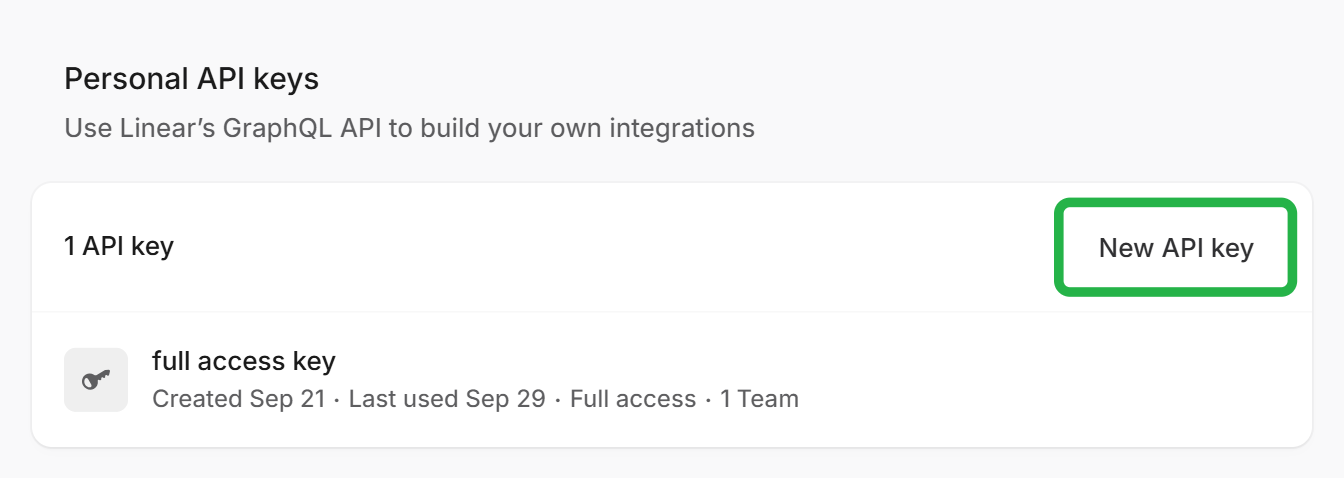
In the Personal API keys section, click New API key.
-
If needed, limit the key's permissions and the teams it can access.
-
Copy the created key.
For details, see the Linear documentation.
Creating OAuth 2.0 Connection
To create an OAuth 2.0 connection to Linear, perform the following steps:
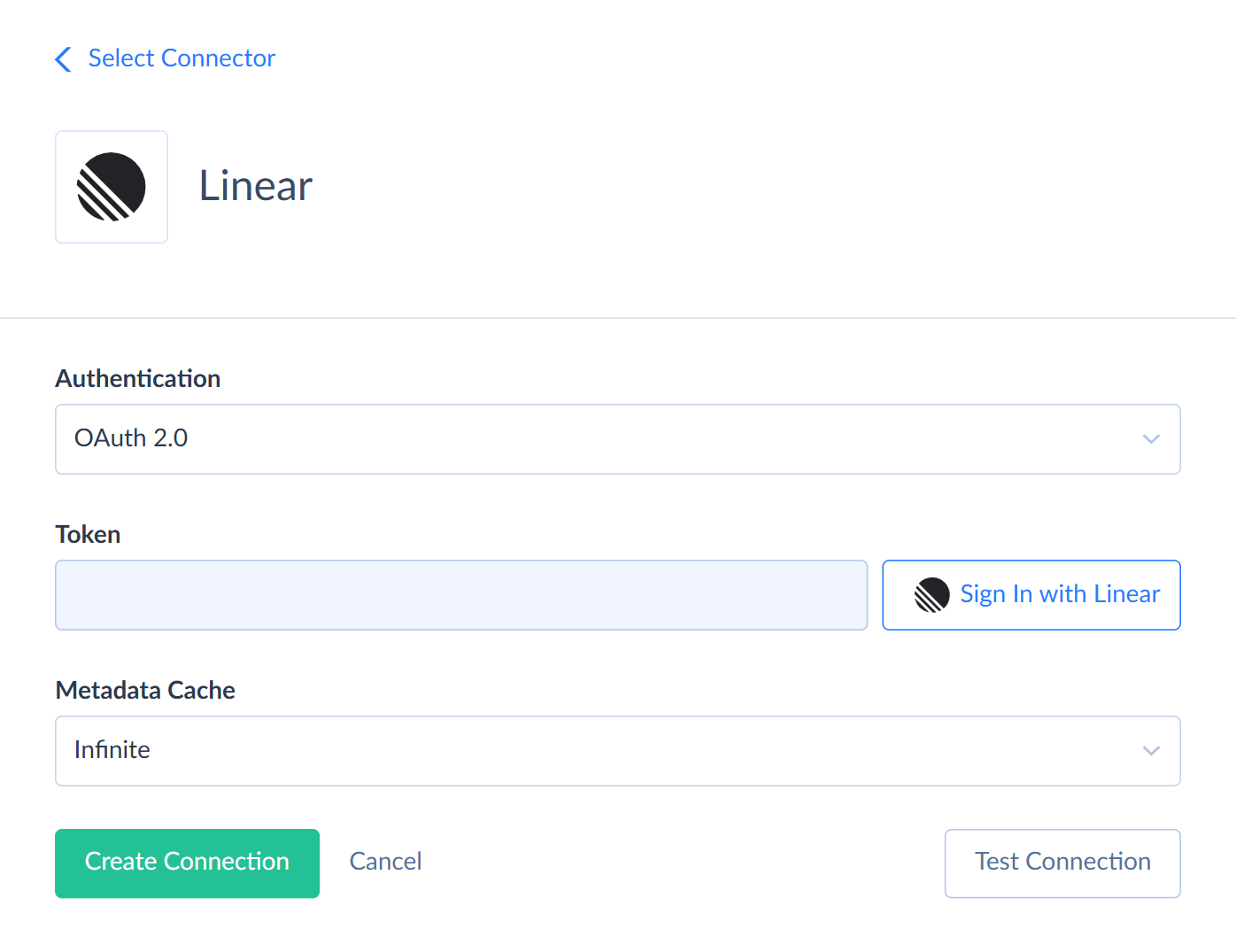
- In the Authentication list, select OAuth 2.0.
- Click Sign In with Linear.
- Sign in to Linear and authorize Skyvia to access your data.
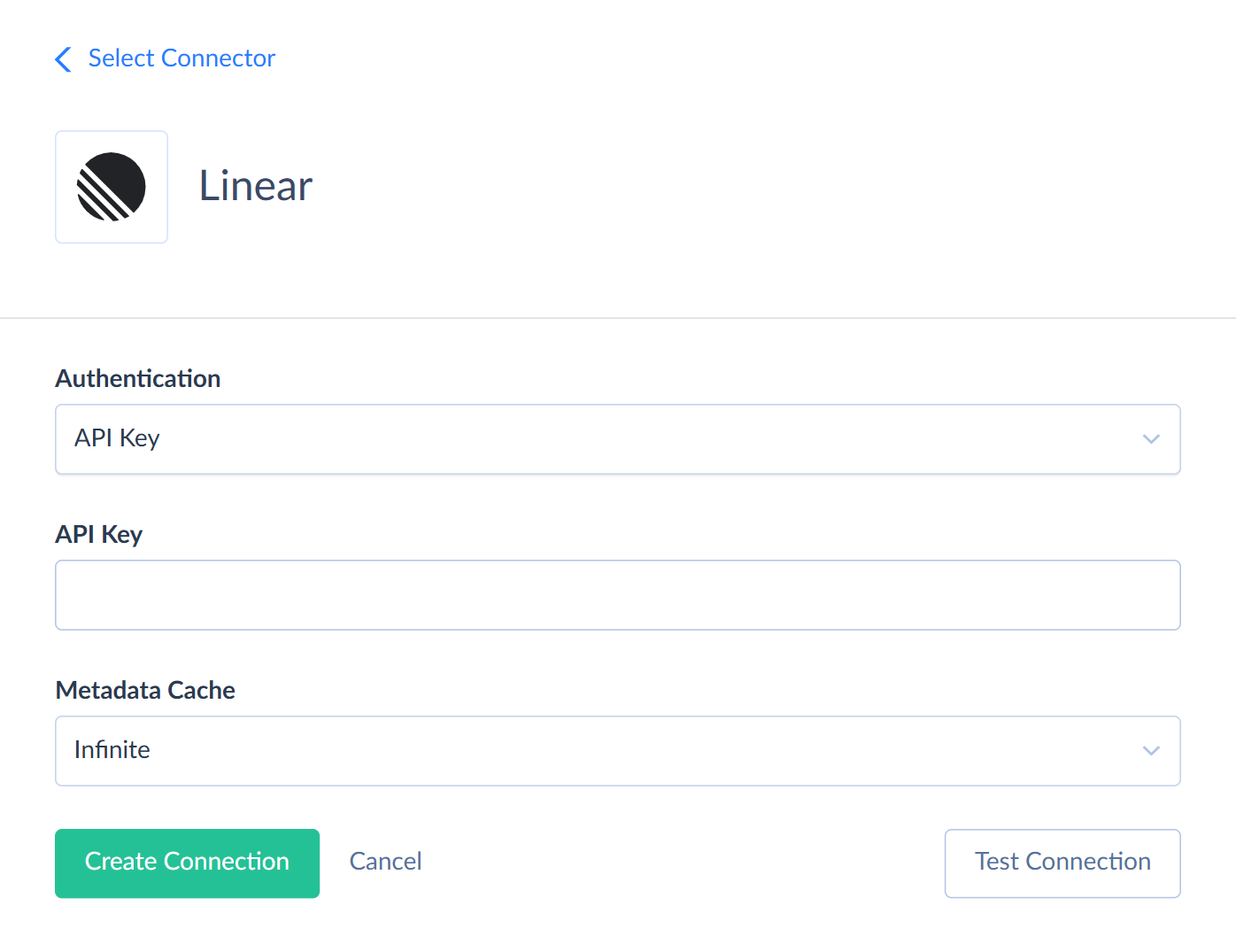
Creating API Key Connection
To create an API key connection to Linear, select API Key in the Authentication list and enter the obtained key in the API Key box.
Additional Connection Parameters
Metadata Cache
You can specify the period after which Metadata Cache expires. By default, the cache doesn't expire.
Connector Specifics
Object Peculiarities
Linear doesn't have a fixed list of objects. Skyvia loads the list of objects and fields from the Linear API, so new Linear objects and fields become available after you refresh the metadata cache. Linear has no custom objects or custom fields.
To work with the Webhooks, UsageAlerts, AuditEntries, AuditEntryTypes, and ArchivedTeams objects, the Linear user must be a workspace admin.
Child Objects
Objects named <Parent>_<Field> store child records of a parent object, for example Issues_History or Projects_ExternalLinks. These objects are read-only. Each has a <Parent>_Id field, for example Issue_Id or Project_Id, that refers to the parent record.
By default, Skyvia reads all the parent records along with their child records. This takes time and uses many API requests. To avoid that, filter by the <Parent>_Id field when querying child objects.
Nested Objects
Some fields store arrays of values in JSON format. Each such field has a nested type that defines the structure of its items. The StringValueType and DoubleValueType types have a single Value field. The IdType type has a single Id field that stores the ID of a related record.
| Object | Field | Nested type |
|---|---|---|
| AdministrableTeams | ResourceSections | TeamResourceSectionType |
| PinnedResources | TeamPinnedResourceType | |
| Facets | FacetType | |
| Posts | PostType | |
| AgentActivities | PushSummary_ |
StringValueType |
| AgentSessions | PullRequest_ |
StringValueType |
| ExternalLinks | AgentSessionExternalLinkType | |
| AgentSessions_ |
PullRequest_ |
StringValueType |
| ArchivedTeams | ResourceSections | TeamResourceSectionType |
| PinnedResources | TeamPinnedResourceType | |
| Facets | FacetType | |
| Posts | PostType | |
| Comments | DocumentContent_ |
StringValueType |
| Reactions | ReactionType | |
| SyncedWith | ExternalEntityInfoType | |
| Customers | Domains, ExternalIds | StringValueType |
| CustomViews | View |
StringValueType |
| Cycles | IssueCountHistory, Completed |
DoubleValueType |
| Documents | Subscribers | IdType |
| Favorites | PullRequest_ |
StringValueType |
| Initiatives | Facets | FacetType |
| LabelIds, DocumentContent_ |
StringValueType | |
| InitiativeUpdates | Reactions | ReactionType |
| Issues | LabelIds, PreviousIdentifiers, DocumentContent_ |
StringValueType |
| Subscribers, Releases | IdType | |
| Reactions | ReactionType | |
| SyncedWith | ExternalEntityInfoType | |
| Issues_History | AddedLabelIds, RemovedLabelIds, AddedToReleaseIds, Removed |
StringValueType |
| RelationChanges | IssueRelationHistoryPayloadType | |
| Issues_ |
Metadata_Reasons | StringValueType |
| PresentedReasons | PresentedIssueSuggestionReasonType | |
| Issues_Suggestions | Metadata_Reasons | StringValueType |
| PresentedReasons | PresentedIssueSuggestionReasonType | |
| ProjectMilestones | DocumentContent_ |
StringValueType |
| Projects | Teams, Members | IdType |
| Facets | FacetType | |
| IssueCountHistory, Completed |
DoubleValueType | |
| LabelIds, DocumentContent_ |
StringValueType | |
| SyncedWith | ExternalEntityInfoType | |
| ProjectUpdates | Reactions | ReactionType |
| ReleaseNotes | Releases | IdType |
| DocumentContent_ |
StringValueType | |
| ReleasePipelines | IncludePathPatterns | StringValueType |
| Releases | IdType | |
| Teams | ResourceSections | TeamResourceSectionType |
| PinnedResources | TeamPinnedResourceType | |
| Facets | FacetType | |
| Posts | PostType | |
| TimeSchedules | Entries | TimeScheduleEntryType |
| Triage |
ManualSelection_ |
StringValueType |
| Webhooks | ResourceTypes, TeamIds | StringValueType |
| Failures | WebhookFailureEventType | |
| PresentedIssueSuggestionReasonType | References | IssueSuggestionReasonReferenceType |
To map the fields of nested types in import, select the Nested Objects checkbox in the integration settings.
Filtering Specifics
Linear supports the following native filters:
| Object | Fields (Operators) |
|---|---|
| AdministrableTeams | Id, Name, Key, Visibility (=, !=, IN),Description ( =, !=, IN, IsNull, IsNotNull),RetiredAt, CreatedAt, UpdatedAt ( =, <, <=, >, >=),Parent_Id, Parent_Name, RestrictedBy_Id, RestrictedBy_Name ( =, IN) |
| AgentActivities | Id (=, !=, IN),SourceComment_Id ( =, IN),CreatedAt, UpdatedAt ( =, <, <=, >, >=) |
| AgentSessions | Id (=) |
| AgentSkills | Id (=, !=, IN),Shared ( =, !=),CreatedAt, UpdatedAt ( =, <, <=, >, >=) |
| ArchivedTeams | Id (=) |
| Attachments | Id, Title, Url, SourceType (=, !=, IN),Subtitle ( =, !=, IN, IsNull, IsNotNull),Creator_Id, Creator_Name ( =, IN),CreatedAt, UpdatedAt ( =, <, <=, >, >=) |
| AuditEntries | Id, Type, Ip, CountryCode (=, !=, IN),Actor_Id, Actor_Name ( =, IN),CreatedAt, UpdatedAt ( =, <, <=, >, >=) |
| Comments | Id, Body (=, !=, IN),Issue_Id, Issue_Title, DocumentContent_Id, ProjectUpdate_Id, InitiativeUpdate_Id, Project_Id, Project_Name, Initiative_Id, Initiative_Name, Parent_Id, User_Id, User_Name ( =, IN),DocumentContent_Content ( =, IN, IsNull, IsNotNull),DocumentContent_CreatedAt, DocumentContent_UpdatedAt, CreatedAt, UpdatedAt ( =, <, <=, >, >=) |
| CustomerNeeds | Id (=, !=, IN),Customer_Id, Customer_Name, Issue_Id, Issue_Title, Project_Id, Project_Name, Comment_Id ( =, IN),Priority ( =, !=, IN, <, <=, >, >=),CreatedAt, UpdatedAt ( =, <, <=, >, >=) |
| Customers | Id, Name, SlackChannelId (=, !=, IN),Status_Id, Status_Name, Owner_Id, Owner_Name, Tier_Id ( =, IN),Revenue, Size ( =, !=, IN, <, <=, >, >=),CreatedAt, UpdatedAt ( =, <, <=, >, >=) |
| CustomerStatuses | Id (=) |
| CustomerTiers | Id (=) |
| CustomViews | Id, Name, ModelName (=, !=, IN),Creator_Id, Creator_Name, Team_Id, Team_Name ( =, IN),Shared ( =, !=),CreatedAt, UpdatedAt ( =, <, <=, >, >=) |
| Cycles | Id, Name (=, !=, IN),Number ( =, !=, IN, <, <=, >, >=),StartsAt, EndsAt, CompletedAt, CreatedAt, UpdatedAt ( =, <, <=, >, >=),Team_Id, Team_Name ( =, IN),IsActive, IsFuture, IsPast, IsNext, IsPrevious ( =, !=) |
| Documents | Id, Title, SlugId (=, !=, IN),Creator_Id, Creator_Name, Owner_Id, Owner_Name, Project_Id, Project_Name, Initiative_Id, Initiative_Name, Team_Id, Team_Name, Issue_Id, Issue_Title, Release_Id, Release_Name, Cycle_Id, Cycle_Name ( =, IN),CreatedAt, UpdatedAt ( =, <, <=, >, >=) |
| Emojis | Id, Name (=, !=, IN),CreatedAt, UpdatedAt ( =, <, <=, >, >=) |
| ExternalUsers | Id (=) |
| Favorites | Id (=) |
| InitiativeLabels | Id, Name (=, !=, IN),IsGroup ( =, !=),Creator_Id, Creator_Name, Parent_Id, Parent_Name ( =, IN),CreatedAt, UpdatedAt ( =, <, <=, >, >=) |
| InitiativeRelations | Id (=) |
| Initiatives | Id, Name, Status, SlugId, Health (=, !=, IN),Creator_Id, Creator_Name, Owner_Id, Owner_Name, LeadTeam_Id, LeadTeam_Name ( =, IN),TargetDate, Priority ( =, !=, IN, IsNull, IsNotNull, <, <=, >, >=),StartedAt, CompletedAt, CanceledAt, CreatedAt, UpdatedAt ( =, <, <=, >, >=) |
| InitiativeToProjects | Id (=) |
| InitiativeUpdates | Id (=, !=, IN),Initiative_Id, Initiative_Name, User_Id, User_Name ( =, IN),CreatedAt, UpdatedAt ( =, <, <=, >, >=) |
| Integrations | Id (=) |
| IntegrationTemplates | Id (=) |
| IssueLabels | Id, Name (=, !=, IN),IsGroup ( =, !=),Team_Id, Team_Name, Creator_Id, Creator_Name, Parent_Id, Parent_Name ( =, IN),CreatedAt, UpdatedAt ( =, <, <=, >, >=) |
| IssueRelations | Id (=) |
| Issues | Id, Title (=, !=, IN),Team_Id, Team_Name, Cycle_Id, Cycle_Name, Project_Id, Project_Name, ProjectMilestone_Id, LastAppliedTemplate_Id, LastAppliedTemplate_Name, RecurringIssueTemplate_Id, RecurringIssueTemplate_Name, Creator_Id, Creator_Name, Assignee_Id, Assignee_Name, Delegate_Id, Delegate_Name, SnoozedBy_Id, SnoozedBy_Name, State_Id, State_Name, Parent_Id, Parent_Title ( =, IN),Number ( =, !=, IN, <, <=, >, >=),ArchivedAt, StartedAt, CompletedAt, TriagedAt, CanceledAt, AutoClosedAt, AutoArchivedAt, SlaBreachesAt, AddedToCycleAt, SnoozedUntilAt, CreatedAt, UpdatedAt ( =, <, <=, >, >=),Priority, Estimate, DueDate ( =, !=, IN, IsNull, IsNotNull, <, <=, >, >=),ProjectMilestone_Name ( =, IN, IsNull, IsNotNull),Description ( =, !=, IN, IsNull, IsNotNull) |
| IssueToReleases | Id (=) |
| Notifications | Id, Type (=, !=, IN),ArchivedAt, CreatedAt, UpdatedAt ( =, <, <=, >, >=) |
| NotificationSubscriptions | Id (=) |
| OrganizationInvites | Id (=) |
| ProjectLabels | Id, Name (=, !=, IN),IsGroup ( =, !=),Team_Id, Team_Name, Creator_Id, Creator_Name, Parent_Id, Parent_Name ( =, IN),CreatedAt, UpdatedAt ( =, <, <=, >, >=) |
| ProjectMilestones | Id (=, !=, IN),Name ( =, !=, IN, IsNull, IsNotNull),Project_Id, Project_Name ( =, IN),TargetDate ( =, !=, IN, IsNull, IsNotNull, <, <=, >, >=),CreatedAt, UpdatedAt ( =, <, <=, >, >=) |
| ProjectRelations | Id (=) |
| Projects | Id, Name, SlugId, Health (=, !=, IN),Status_Id, Status_Name, Creator_Id, Creator_Name, Lead_Id, Lead_Name, LeadTeam_Id, LeadTeam_Name, LastAppliedTemplate_Id, LastAppliedTemplate_Name ( =, IN),StartDate, TargetDate, Priority ( =, !=, IN, IsNull, IsNotNull, <, <=, >, >=),StartedAt, CompletedAt, CanceledAt, CreatedAt, UpdatedAt ( =, <, <=, >, >=) |
| ProjectUpdates | Id (=, !=, IN),Project_Id, Project_Name, User_Id, User_Name ( =, IN),CreatedAt, UpdatedAt ( =, <, <=, >, >=) |
| ReleaseNotes | Id, Title, SlugId (=, !=, IN),Pipeline_Id, Pipeline_Name ( =, IN),CreatedAt, UpdatedAt ( =, <, <=, >, >=) |
| ReleasePipelines | Id, Name (=, !=, IN),Type ( =, !=, IN, IsNull, IsNotNull),IsProduction ( =, !=),CreatedAt, UpdatedAt ( =, <, <=, >, >=) |
| Releases | Id, Name, Version (=, !=, IN),Pipeline_Id, Pipeline_Name, Stage_Id, Stage_Name ( =, IN),CompletedAt, CreatedAt, UpdatedAt ( =, <, <=, >, >=) |
| ReleaseSearch | Id, Name, Version (=, !=, IN),Pipeline_Id, Pipeline_Name, Stage_Id, Stage_Name ( =, IN),CompletedAt, CreatedAt, UpdatedAt ( =, <, <=, >, >=) |
| ReleaseStages | Id, Name (=, !=, IN),Type ( =, !=, IN, IsNull, IsNotNull),CreatedAt, UpdatedAt ( =, <, <=, >, >=) |
| TeamMemberships | Id (=) |
| Teams | Id, Name, Key, Visibility (=, !=, IN),Description ( =, !=, IN, IsNull, IsNotNull),RetiredAt, CreatedAt, UpdatedAt ( =, <, <=, >, >=),Parent_Id, Parent_Name, RestrictedBy_Id, RestrictedBy_Name ( =, IN) |
| Templates | Id (=) |
| TemplateSearch | Id, Type, Name (=, !=, IN),Team_Id, Team_Name ( =, IN),CreatedAt, UpdatedAt ( =, <, <=, >, >=) |
| TimeSchedules | Id (=) |
| TriageResponsibilities | Id (=) |
| UsageAlerts | Id, Type (=, !=, IN),CreatedAt, UpdatedAt ( =, <, <=, >, >=) |
| Users | Id, Name, DisplayName, Email (=, !=, IN),App, Active, IsMe, Admin, Owner ( =, !=),CreatedAt, UpdatedAt ( =, <, <=, >, >=) |
| Webhooks | Id (=) |
| WorkflowStates | Id, Name, Type, Description (=, !=, IN),Team_Id, Team_Name ( =, IN),Position ( =, !=, IN, <, <=, >, >=),CreatedAt, UpdatedAt ( =, <, <=, >, >=) |
| AgentSessions_PullRequests | AgentSession_Id (=) |
| Comments_AiPromptProgresses | Comment_Id (=, IN) |
| CustomViews_Updates | CustomView_Id (=, IN) |
| Cycles_Links | Cycle_Id (=, IN) |
| Initiatives_History | Initiative_Id (=, IN) |
| Initiatives_Links | Initiative_Id (=, IN) |
| Issues_AiPromptProgresses | Issue_Id (=, IN) |
| Issues_History | Issue_Id (=, IN) |
| Issues_IncomingSuggestions | Issue_Id (=, IN) |
| Issues_StateHistory | Issue_Id (=, IN) |
| Issues_Suggestions | Issue_Id (=, IN) |
| Projects_Attachments | Project_Id (=, IN) |
| Projects_ExternalLinks | Project_Id (=, IN) |
| Projects_History | Project_Id (=, IN) |
| Releases_History | Release_Id (=, IN) |
| Releases_Links | Release_Id (=, IN) |
| Teams_GitAutomationStates | Team_Id (=, IN) |
The ArchivedIntegrations, AuditEntryTypes, InboxNotifications, IssuePriorityValues, PartnerProgramPartners, and ProjectStatuses objects don't support native filtering.
For all objects except child objects, you can combine native filters with the AND and OR operators.
Sorting Specifics
Linear supports native sorting for the following fields:
| Object | Fields |
|---|---|
| CustomViews | Name, CreatedAt, UpdatedAt |
| Documents | Title, CreatedAt, UpdatedAt |
| Emojis | CreatedAt |
| Initiatives | Name, TargetDate, Health, HealthUpdatedAt, CreatedAt, UpdatedAt |
| Issues | Title, CompletedAt, DueDate, CreatedAt, UpdatedAt |
| Projects | Name, StartDate, TargetDate, Health, CreatedAt, UpdatedAt |
| ReleasePipelines | Name |
| Users | Name, DisplayName |
API Limits
Linear limits the number of API requests and the total complexity of requests per hour. When the remaining limit runs low, Skyvia slows down sending requests to avoid errors. Large replications and queries to child objects without filters can take longer. For details, see Linear rate limiting.
Incremental Replication and Synchronization
Skyvia supports Replication with Incremental Updates for all Linear objects except ArchivedIntegrations, AuditEntryTypes, IssuePriorityValues, PartnerProgramPartners, and Issues_StateHistory.
Skyvia supports Synchronization for the objects that support Incremental Updates and the INSERT and UPDATE operations.
DML Operations Support
Skyvia supports the following DML operations for Linear objects:
| Operation | Object |
|---|---|
| INSERT, UPDATE, DELETE | AgentSkills, Attachments, Comments, CustomerNeeds, Customers, CustomerStatuses, CustomerTiers, CustomViews, Documents, Favorites, InitiativeLabels, InitiativeRelations, Initiatives, InitiativeToProjects, IssueLabels, IssueRelations, Issues, OrganizationInvites, ProjectLabels, ProjectMilestones, ProjectRelations, Projects, ReleaseNotes, ReleasePipelines, Releases, TeamMemberships, Teams, Templates, TimeSchedules, TriageResponsibilities, Webhooks |
| INSERT, UPDATE | AgentSessions, InitiativeUpdates, ProjectUpdates, ReleaseStages, WorkflowStates |
| INSERT, DELETE | Emojis, IntegrationTemplates, IssueToReleases |
| UPDATE, DELETE | Integrations |
| UPDATE | Cycles, Users |
The Id and CreatedAt fields are optional for the INSERT operation. If you leave them empty, Linear generates their values.
Supported Actions
Skyvia supports all the common actions for Linear.