Blackbaud's Raiser's Edge NXT
Blackbaud's Raiser's Edge NXT is a cloud fundraising and donor management solution for nonprofits.
Data integration: Skyvia supports importing data to and from Raiser's Edge NXT, exporting Raiser's Edge NXT data to CSV files, replicating Raiser's Edge NXT data to relational databases, and synchronizing Raiser's Edge NXT data with other cloud apps and relational databases.
Backup: Skyvia Backup does not support Raiser's Edge NXT.
Query: Skyvia Query supports Raiser's Edge NXT.
Establishing Connection
To create a connection to Raiser's Edge NXT, sign in with your Blackbaud ID.
Creating Connection
To connect to Raiser's Edge NXT, perform the following steps:
-
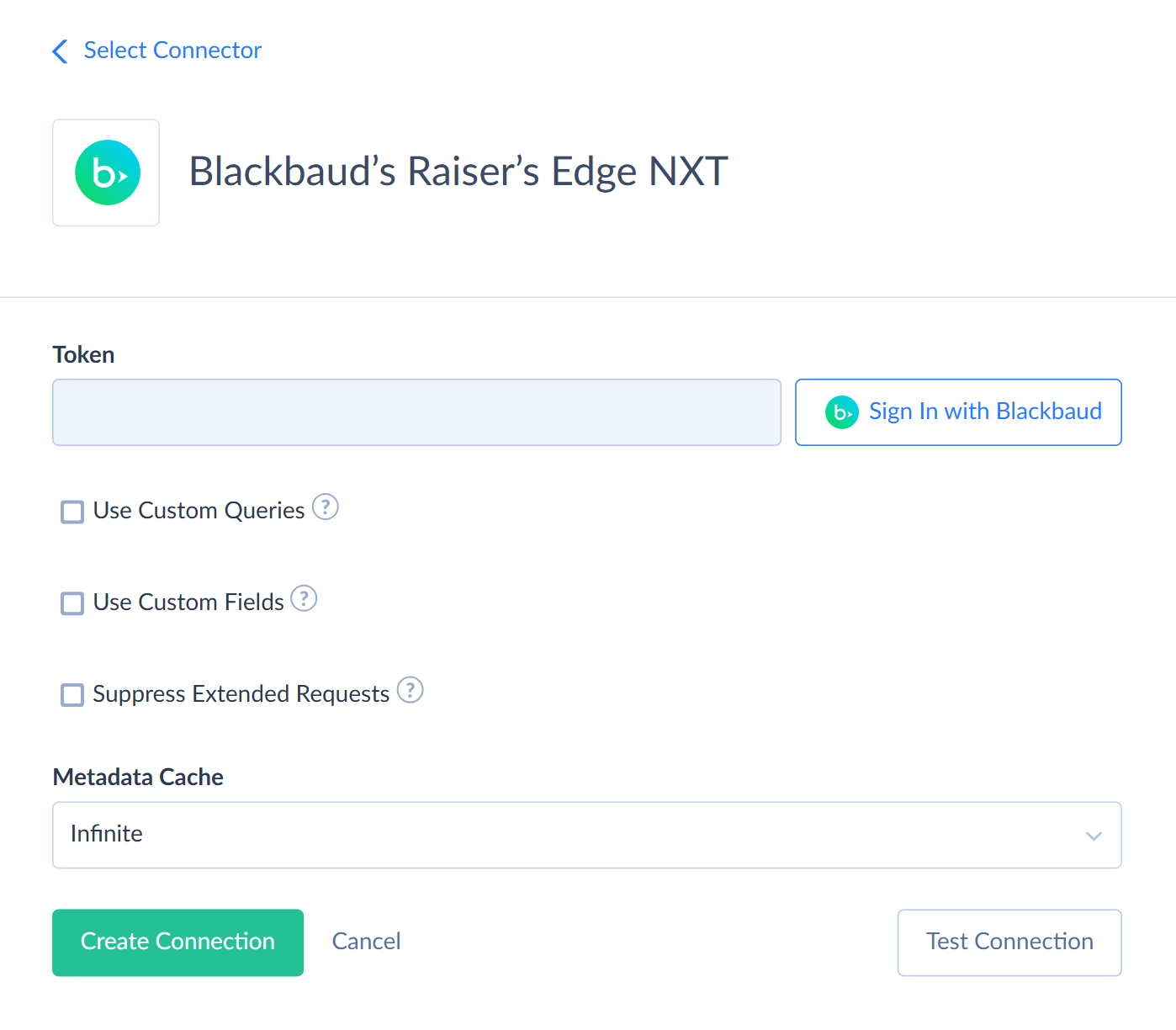
Click Sign In with Blackbaud in the Connection Editor.
-
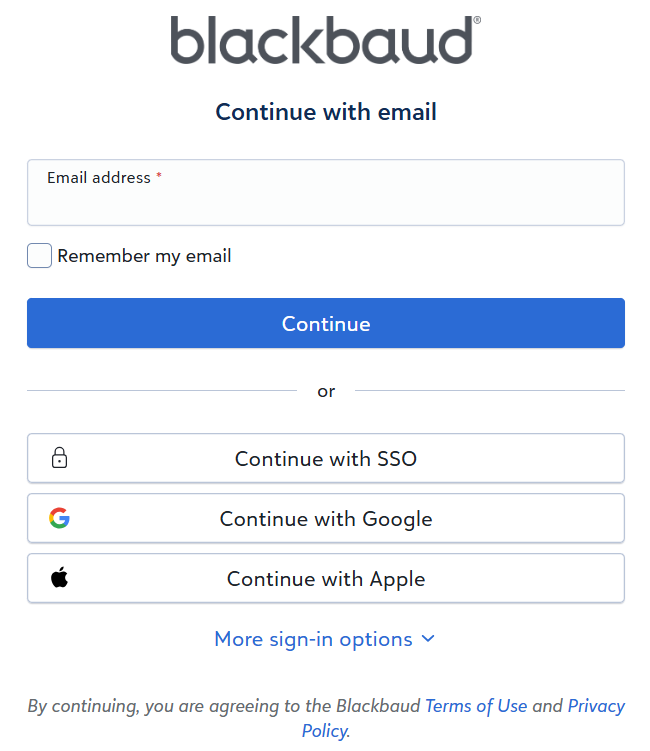
Sign in with your Blackbaud ID.
-
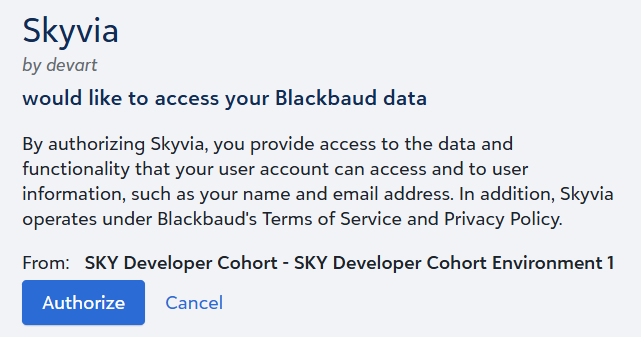
Authorize Skyvia to access your Raiser's Edge NXT data.
Additional Connection Parameters
Metadata Cache
You can specify the period after which Metadata Cache expires. By default, the cache doesn't expire. If you change the output fields of a saved Raiser's Edge NXT query, clear the metadata cache to see the new fields.
Use Custom Queries
Select this checkbox to work with your saved Raiser's Edge NXT queries as read-only objects. For details, see Saved Query Objects.
Use Custom Fields
Select this checkbox to work with custom fields as fields of the objects they belong to. Reading custom fields uses one additional API call for each record. For details, see Custom Fields.
Suppress Extended Requests
For some objects, Raiser's Edge NXT API returns only part of the fields when querying multiple records. To read these fields, Skyvia performs an additional request for each record. This can decrease performance and significantly increase the number of API calls.
The additional fields are the following:
| Object | Fields |
|---|---|
| Constituents | RequestsNoEmail, IsSolicitor, NoValidAddress, ImportId, IsConstituent, NumSubsidiaries, ParentCorporationName, ParentCorporationId, Birthplace, Ethnicity, Target, Income, ReceiptType, Religion, Industry, NumEmployees, MatchesGifts, MatchingGiftFactor, Matching |
| ConstituentAddresses | Region, InformationSource, Lot, Cart, Dpc |
| Events | Description, GroupId, GroupName, GroupIsInactive, LocationName, LocationAddressLines, LocationPostalCode, LocationLocalityName, Location |
| Gifts | Origin, RecurringGiftStatusDateD, RecurringGiftStatusDateM, RecurringGiftStatusDateY, Recurring |
To skip these additional requests, select the Suppress Extended Requests checkbox. In this case, these fields return empty values. This checkbox doesn't affect custom fields.
Connector Specifics
Object Peculiarities
Child Objects
Some objects are child objects of another object. If you query a child object without a filter by its parent, Skyvia reads all the parent records first. This takes longer and uses more API calls. To avoid it, filter child objects by the parent ID field:
| Parent Object | Child Objects | Filter By |
|---|---|---|
| Constituents | ConstituentAttachments, Constituent |
ConstituentId |
| ConstituentActions | Constituent |
ActionId |
| ConstituentEducations | EducationCustomFields | EducationId |
| Events | EventAttachments, EventCustomFields, EventExpenses, EventFees, EventParticipants, EventParticipantOptions | EventId |
| EventParticipants | EventParticipantDonations, Event |
ParticipantId |
| EventParticipantPledges | EventId | |
| Appeals | AppealAttachments, AppealCustomFields | AppealId |
| Funds | FundAttachments, FundCustomFields | FundId |
| Fundraisers | FundraiserAssignments, FundraiserGoals | FundraiserId |
| Campaigns | CampaignAttachments, CampaignCustomFields | CampaignId |
| Gifts | GiftAttachments, Membership |
GiftId |
| Tributes | TributeAcknowledgees | TributeId |
| GiftTributes | GiftTributeAcknowledgees | GiftTributeId |
| MembershipMembers | MembershipGifts, MembershipDetails, MembershipSummaries, MembershipBenefits, MembershipCards, MembershipCustomFields, MembershipFundraisers, MembershipLinkedGifts, MembershipTransactions | MemberJunctionId |
| MembershipCategories | MembershipRenewalNotices, MembershipSubcategories, MembershipDefaultBenefits | MembershipCategoryId |
| Opportunities | OpportunityAttachments, OpportunityCustomFields, OpportunityNotes, Opportunity |
OpportunityId |
| CodeTables | CodeTableEntries | CodeTableId |
The parent of FundraiserAssignments and FundraiserGoals isn't available as a separate object.
The EventParticipantDonations, EventParticipantFeePayments, EventParticipantFees, and ParticipantOptions objects are child objects of EventParticipants. If you filter them only by ParticipantId, the EventId field returns empty values. To get EventId values, filter by both EventId and ParticipantId.
Reading Records by Id
When you filter the following objects by Id, some of their fields return empty values:
| Object | Fields |
|---|---|
| ConstituentCodes | CreatedDate, UpdatedDate, Inactive |
| ConstituentAddresses | CreatedDate, UpdatedDate |
| ConstituentEducations | CreatedDate, UpdatedDate |
| ConstituentActions | StatusCode |
To get values of these fields, filter the records by another field, for example by the parent ID or a date.
Recently Changed Records
Raiser's Edge NXT returns new and changed records only several minutes after the change. If you query an object right after importing data to it, the result may not show the changes yet.
Attachments
When you import data to the ConstituentAttachments, ConstituentActionAttachments, EventAttachments, AppealAttachments, FundAttachments, CampaignAttachments, GiftAttachments, and OpportunityAttachments objects, map either the Content field or the Url field, not both:
- To upload a file, map Content and FileName.
- To add a link to an external document, map Url. Don't map FileName.
Skyvia sets the Type field automatically. When you query these objects, Content returns an empty value if the file is missing or its link has expired.
Code Table Fields
Some fields accept only values from Raiser's Edge NXT code tables:
| Object | Fields | Value to Use |
|---|---|---|
| VolunteerTypes | Type, Status | Entry value |
| VolunteerSkills | SkillDescription, SkillLevel, LicenseType | Entry value |
| VolunteerInterests | Description | Entry value |
| OpportunityNotes | NoteTypeName | Entry value |
| MembershipDetails | CategoryName, ProgramName, SubCategoryName | Entry ID |
| MembershipCards | CardType | Entry ID |
To find the allowed values, look up the code table by Name in the CodeTables object. Then query the CodeTableEntries object filtered by its CodeTableId.
When you query MembershipDetails and MembershipCards, these fields return entry names. When you import data, use entry IDs instead.
Membership Cards
To update or delete MembershipCards records, filter by both MemberJunctionId and Id. Otherwise, Skyvia searches all memberships for the card, which takes longer. Some cards can't be updated, for example joint cards with the Editable field set to false.
Deleting Records
When you delete records from the following objects, include the parent ID in the filter. Otherwise, deleting a record that doesn't exist may be reported as one deleted record.
| Object | Field |
|---|---|
| ConstituentAliases | ConstituentId |
| Constituent |
ConstituentId |
| ConstituentEmailAddresses | ConstituentId |
| Constituent |
ConstituentId |
| ConstituentRatings | ConstituentId |
| EducationCustomFields | EducationId |
| VolunteerTypes | ConstituentId |
| VolunteerSkills | ConstituentId |
| VolunteerInterests | ConstituentId |
Deleting a record doesn't delete its child records. Raiser's Edge NXT doesn't allow deleting records that other records depend on, for example an event with participants or a participant with a gift.
Saved Query Objects
If you select Use Custom Queries in the connection settings, Skyvia adds your saved Raiser's Edge NXT queries as read-only objects.
Each object is named after its query. Skyvia replaces double quotes with single quotes, adds the Query suffix to names that don't end with it, and adds a number to repeated names.
Each object has the output fields of its query and the QRECID field, which stores the ID of the source record. QRECID isn't unique. Queries with one-to-many output fields return several rows with the same QRECID.
The criteria saved in a query always apply, and your filters apply on top of them. Skyvia can't pass values for Ask criteria, so Raiser's Edge NXT treats them as any value.
For dynamic queries, Raiser's Edge NXT applies filters and sorting. For static queries and queries with filtered aggregate fields, Skyvia reads the whole query result first, so filters don't make these queries faster. Raiser's Edge NXT always builds the full query result, so limiting the number of rows doesn't make a query faster either.
You can combine filters with AND and OR and use one level of parentheses. Deeper nesting causes an error.
Skyvia doesn't list the following queries:
- queries that the Raiser's Edge NXT API can't run
- queries with the SingleRow result layout
- queries with a Median or Mode aggregate field that has its own filters
If a query fails, the API doesn't report the reason. To see it, run the query in Raiser's Edge NXT.
Custom Fields
Skyvia supports custom fields for the Constituents, ConstituentActions, ConstituentEducations, Events, Gifts, Appeals, Campaigns, Funds, Opportunities, and MembershipMembers objects. To work with them, select Use Custom Fields in the connection settings.
Custom fields come from the custom field categories of each object, so they differ between Raiser's Edge NXT databases:
- A single-value category adds three fields: <Category> Value, <Category> Comment, and <Category> Date. For a FuzzyDate category, <Category> ValueY, <Category> ValueM, and <Category> ValueD replace the Value field.
- A multi-value category adds one field named after the category. It stores a JSON array of values, each with its value, comment, date, and custom field record ID.
Custom fields have the following types:
| Raiser's Edge NXT Type | DBType |
|---|---|
| Text, Search, TableEntry | String |
| Number, ConstituentId | Integer |
| Currency | Decimal |
| Date | Date |
| Boolean | Boolean |
| CodeTableEntry | String. Enum |
| FuzzyDate | Integer |
Reading custom fields uses one additional API call for each record. Suppress Extended Requests doesn't affect these calls, so select custom fields only when you need them.
When you import a record with custom field values, Skyvia creates the record first and then writes its custom field values. Map values of multi-value categories as a JSON array. If Skyvia creates the record but fails to write its custom field values, the error message includes the ID of the created record. Use it to avoid creating a duplicate when you run the import again.
You can work with custom field values as records of the ConstituentCustomFields, GiftCustomFields, and other *CustomFields objects. To change a custom field value of an existing record, update its record in the corresponding *CustomFields object. The *CustomFieldCategories objects list the categories.
Nested Objects
Some fields store arrays of values in JSON format. The StringValueType type has a single Value field.
| Object | Field | Nested Type |
|---|---|---|
| ConstituentAttachments | Tags | StringValueType |
| ConstituentActions | Fundraisers | StringValueType |
| Constituent |
Tags | StringValueType |
| ConstituentMemberships | Members | ConstituentMembersType |
| ConsentChannelCategories | Categories | Consent |
| EventAttachments | Tags | StringValueType |
| EventParticipants | Guests | GuestsType |
| Memberships | MembershipsType | |
| ParticipantOptions | ParticipantOptionsType | |
| Fees | FeesType | |
| EventParticipantOptions | ListOptions | Event |
| AppealAttachments | Tags | StringValueType |
| FundAttachments | Tags | StringValueType |
| CampaignAttachments | Tags | StringValueType |
| GiftAttachments | Tags | StringValueType |
| OpportunityAttachments | Tags | StringValueType |
| Gifts | GiftSplits | GiftSplitsType |
| Fundraisers | GiftFundraisersType | |
| SoftCredits | GiftSoftCreditsType | |
| Receipts | GiftReceiptsType | |
| Acknowledgements | GiftAcknowledgementsType | |
| Payments | GiftPaymentsType | |
| LinkedGifts | StringValueType | |
| MembershipTransactions | Gifts | GiftsType |
| Opportunities | Fundraisers | FundraisersType |
| LinkedGifts | StringValueType | |
| Consent |
SolicitCodeAssignments | Solicit |
| ParticipantOptionsType | Values | ValuesType |
To map the fields of nested types in import, select the Nested Objects checkbox in the integration settings.
Filtering Specifics
Raiser's Edge NXT API supports the following native filters:
| Object | Fields and Operators |
|---|---|
| Constituents | Id, AddressPostalCode, FundraiserStatus (=)CreatedDate, UpdatedDate ( >, >=) |
| ConstituentCodes | Id (=)CreatedDate, UpdatedDate ( >, >=) |
| ConstituentAttachments | ConstituentId (=) |
| ConstituentCustomFields | Category, ConstituentId (=)CreatedDate, UpdatedDate ( >, >=) |
| Constituent |
ConstituentId (=) |
| ConstituentActions | Id, StatusCode, ComputedStatus (=)CreatedDate, UpdatedDate ( >, >=) |
| Constituent |
ActionId (=) |
| Constituent |
ActionId (=) |
| ConstituentActionNotes | Id, ActionId (=) |
| ConstituentAddresses | Id, ConstituentId (=)CreatedDate, UpdatedDate ( >, >=) |
| ConstituentAliases | ConstituentId (=) |
| Constituent |
ConstituentId (=) |
| ConstituentAppeals | ConstituentId (=) |
| ConstituentEducations | Id (=)CreatedDate, UpdatedDate ( >, >=) |
| EducationCustomFields | EducationId (=) |
| ConstituentMemberships | CreatedDate, UpdatedDate (>, >=) |
| ConstituentRatings | ConstituentId (=) |
| Constituent |
SourceName (=) |
| ConstituentRelationships | Id (=)CreatedDate, UpdatedDate ( >, >=) |
| ConstituentEmailAddresses | ConstituentId (=)CreatedDate, UpdatedDate ( >, >=) |
| ConstituentNotes | Id (=)CreatedDate, UpdatedDate ( >, >=) |
| Constituent |
ConstituentId (=)CreatedDate, UpdatedDate ( >, >=) |
| ConstituentPhones | Id, ConstituentId (=)CreatedDate, UpdatedDate ( >, >=) |
| Constituent |
ConstituentId (=) |
| Constituent |
Id, ConstituentId (=) |
| ConsentChannelCategories | Channel (=) |
| ConstituentConsents | ConstituentId, Channel, Source, Response (=) |
| ConstituentSolicitCodes | ConstituentId (=) |
| Events | Id, Name, CategoryName, LookupId (=)StartDate ( >=)CreatedDate, UpdatedDate ( >, >=) |
| EventAttachments | EventId (=) |
| EventCustomFields | EventId (=) |
| EventExpenses | EventId (=) |
| EventFees | EventId (=) |
| EventParticipants | EventId, RsvpStatus, Attended, InvitationStatus, ParticipationLevelName, IsConstituent, OnlineDataHealth (=)CreatedDate, UpdatedDate ( >, >=) |
| EventParticipantDonations | EventId, ParticipantId (=) |
| Event |
EventId, ParticipantId (=) |
| EventParticipantFees | EventId, ParticipantId (=) |
| ParticipantOptions | EventId, ParticipantId (=) |
| EventParticipantOptions | EventId (=) |
| EventParticipantPledges | EventId (=) |
| Appeals | Id (=)CreatedDate, UpdatedDate ( >, >=) |
| AppealAttachments | AppealId (=) |
| AppealCustomFields | AppealId (=) |
| Funds | Id (=)CreatedDate, UpdatedDate ( >, >=) |
| FundAttachments | FundId (=) |
| FundCustomFields | FundId (=) |
| FundraiserAssignments | FundraiserId (=) |
| Campaigns | Id (=)CreatedDate, UpdatedDate ( >, >=) |
| CampaignAttachments | CampaignId (=) |
| CampaignCustomFields | CampaignId (=) |
| FundraiserGoals | FundraiserId (=) |
| Packages | Id, AppealId (=)CreatedDate, UpdatedDate ( >, >=) |
| Gifts | Id, ConstituentId, Type, PostStatus (=)Date, AmountValue ( >=)CreatedDate, UpdatedDate ( >, >=) |
| GiftCustomFields | GiftId, Category, Value (=) |
| GiftAttachments | GiftId (=) |
| Tributes | Id (=) |
| TributeAcknowledgees | TributeId (=) |
| GiftTributes | Id (=) |
| GiftTributeAcknowledgees | GiftTributeId (=) |
| MembershipGifts | MemberJunctionId (=) |
| MembershipDetails | MemberJunctionId (=) |
| MembershipSummaries | MemberJunctionId (=) |
| MembershipRenewalNotices | MembershipCategoryId (=) |
| MembershipSubcategories | MembershipCategoryId (=) |
| MembershipBenefits | MemberJunctionId (=) |
| MembershipDefaultBenefits | MembershipCategoryId (=) |
| MembershipCards | MemberJunctionId (=) |
| MembershipCustomFields | MemberJunctionId (=) |
| MembershipFundraisers | MemberJunctionId (=) |
| MembershipLinkedGifts | MemberJunctionId (=) |
| Membership |
GiftId (=) |
| MembershipTransactions | MemberJunctionId (=) |
| Opportunities | Id, ConstituentId (=)CreatedDate, UpdatedDate ( >, >=) |
| OpportunityAttachments | OpportunityId (=) |
| OpportunityCustomFields | OpportunityId (=) |
| OpportunityNotes | OpportunityId (=) |
| Opportunity |
OpportunityId (=) |
| VolunteerTypes | ConstituentId (=) |
| VolunteerTimesheets | ConstituentId (=) |
| VolunteerSkills | ConstituentId (=) |
| VolunteerInterests | ConstituentId (=) |
| VolunteerAssignments | ConstituentId (=) |
| Volunteer |
ConstituentId (=) |
| CodeTables | Id, Name, Category (=) |
| CodeTableEntries | CodeTableId, LongDescription, ShortDescription, NumericValue (=) |
Raiser's Edge NXT applies only native filters combined with AND.
Sorting Specifics
Raiser's Edge NXT supports native sorting only for the following fields of the Constituents object: Id, Type, Title, First, Last, Name, PreferredName, Suffix, LookupId, Gender, Middle, FormerName, Title2, Suffix2, MaritalStatus, CreatedDate, UpdatedDate. If you sort by any other field, Skyvia sorts the records itself.
Incremental Replication and Synchronization
Skyvia supports Replication with Incremental Updates for the following objects: Constituents, ConstituentCodes, ConstituentCustomFields, ConstituentActions, ConstituentAddresses, ConstituentEducations, ConstituentMemberships, ConstituentRelationships, ConstituentEmailAddresses, ConstituentNotes, ConstituentOnlinePresences, ConstituentPhones, ConstituentConsents, Events, EventParticipants, ParticipantOptions, EventParticipantOptions, Appeals, Funds, Campaigns, Packages, Gifts, GiftCustomFields, Tributes, Opportunities, OpportunityNotes, CodeTableEntries. For the ConstituentConsents object, Skyvia replicates only new records.
Skyvia supports Synchronization for objects that support the INSERT and UPDATE operations and have the UpdatedDate or CreatedDate field.
Saved query objects don't support Replication with Incremental Updates and Synchronization.
DML Operations Support
Skyvia supports the following DML operations for Raiser's Edge NXT objects:
| Operation | Object |
|---|---|
| INSERT, UPDATE, DELETE | Constituents, ConstituentCodes, ConstituentAttachments, ConstituentCustomFields, ConstituentActions, Constituent |
| INSERT, UPDATE | OpportunityNotes |
| INSERT, DELETE | EventParticipantDonations, Event |
| UPDATE, DELETE | Constituent |
| INSERT | GiftCustomFieldCategories, TributeAcknowledgees |
| UPDATE | GiftTributeAcknowledgees, MembershipGifts, MembershipDetails, Volunteer |
| DELETE | MembershipMembers, MembershipTransactions |
Supported Actions
Skyvia supports all the common actions for Raiser's Edge NXT.