Sentry
Sentry is a cloud-based error tracking and performance monitoring platform that helps developers to identify, fix, and optimize the performance of their applications.
Data integration: Skyvia supports importing data to and from Sentry, exporting Sentry data to CSV files, replicating Sentry data to relational databases, and synchronizing Sentry data with other cloud apps and relational databases.
Backup: Skyvia Backup does not support Sentry.
Query: Skyvia Query supports Sentry.
Establishing Connection
Skyvia supports both Sentry SaaS and self-hosted Sentry. It supports auth token authentication and OAuth 2.0 authentication for Sentry SaaS connections, and token authentication for self-hosted Sentry. For self-hosted Sentry, you can also use agent connections.
Getting Credentials
For Auth Token authentication in Sentry, you can use either a Personal Access Token or Custom Integration Token. Organization tokens are not supported.
Personal Token
Personal token is linked to the corresponding user account and provides access to organizations and projects, available for this user.
To create a Personal Token, perform the following steps:
-
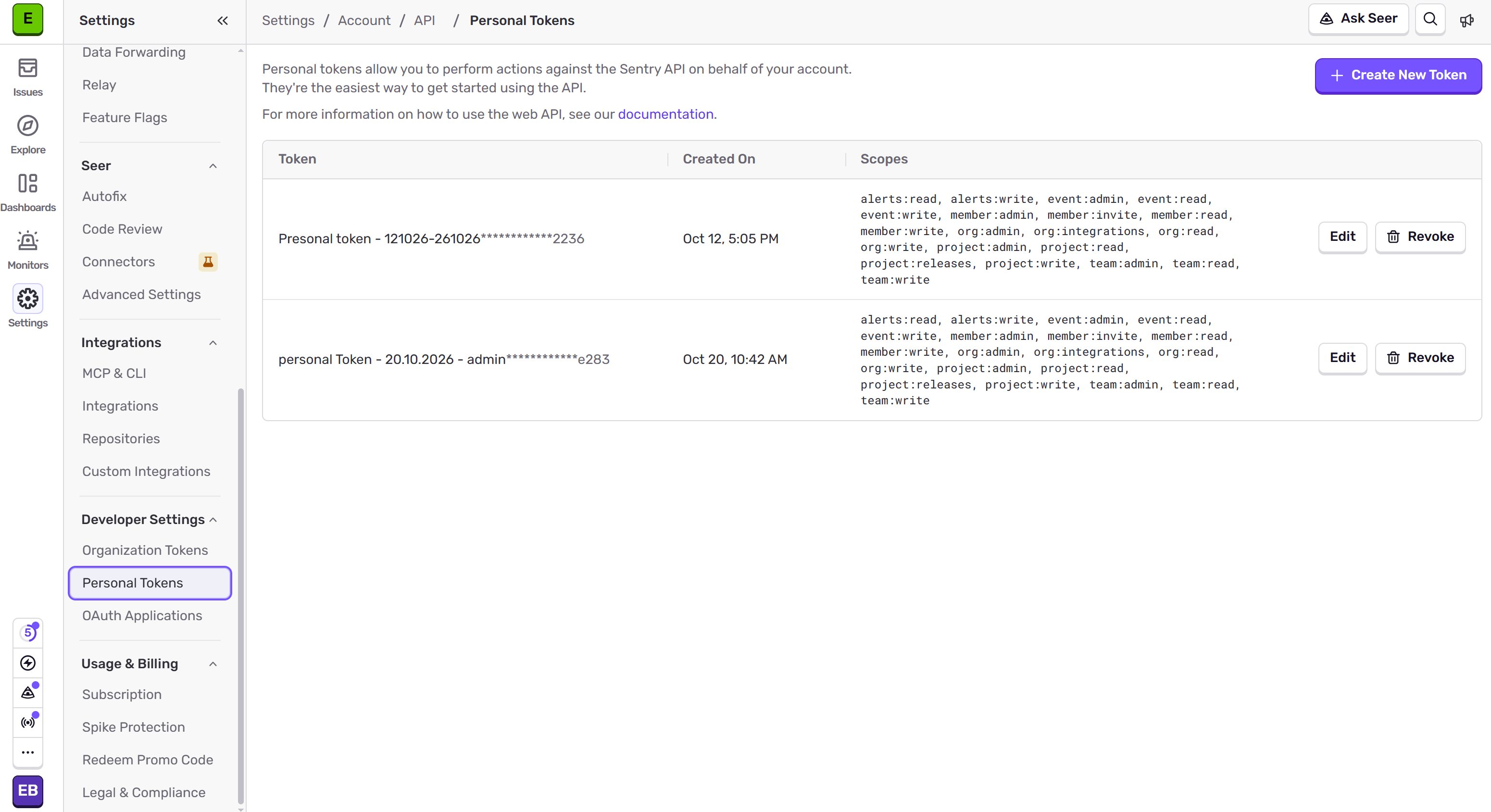
In Sentry, click Settings, and then, under Developer Settings, click Personal Tokens.
-
Click Create New Token.
-
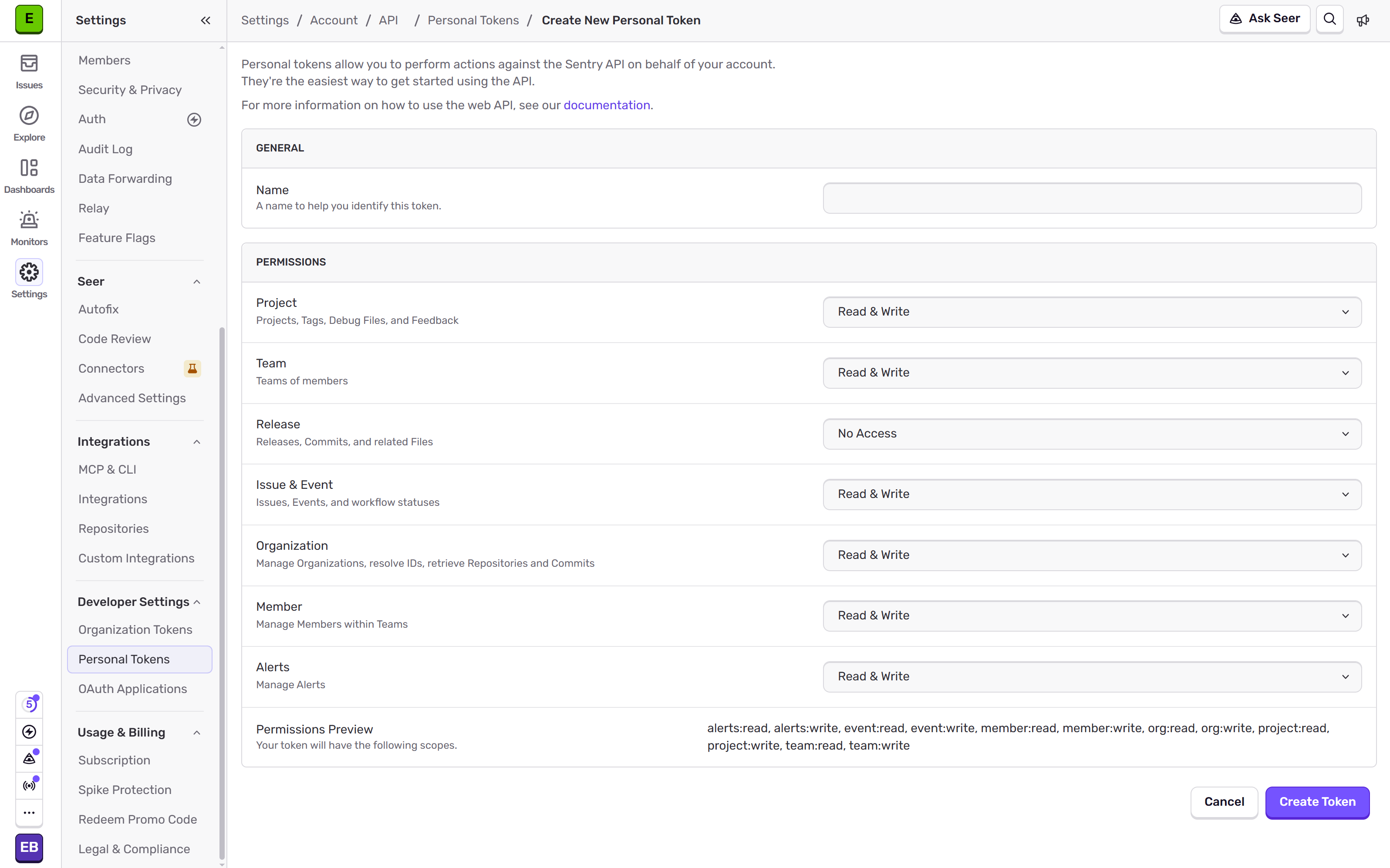
Specify permissions for the token.
-
Specify the token Name, for example, Skyvia.
-
Click Create Token
-
Copy the token and store it somewhere securely.
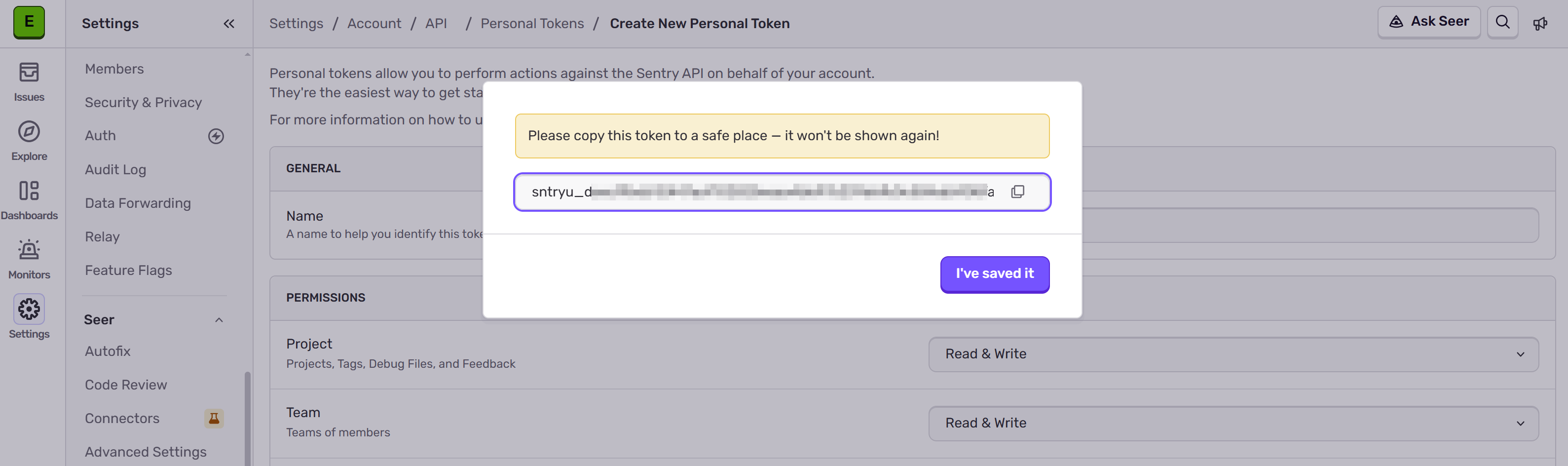
Once you close this dialog, you will no longer be able to see or retrieve the token.
Custom Integration Token
Custom Integration Token is linked to an organization.
To create a Custom Integration Token, perform the following steps:
-
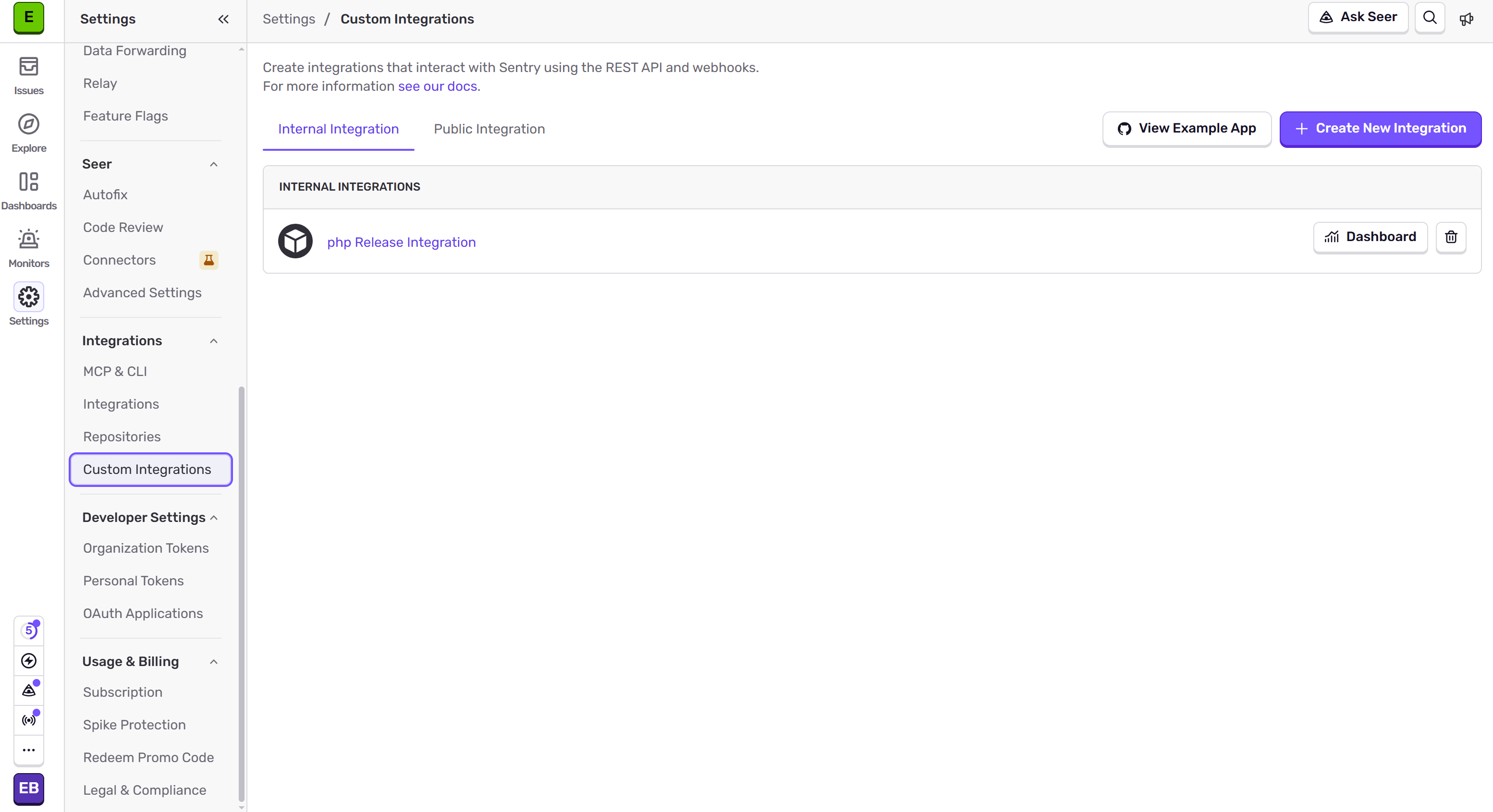
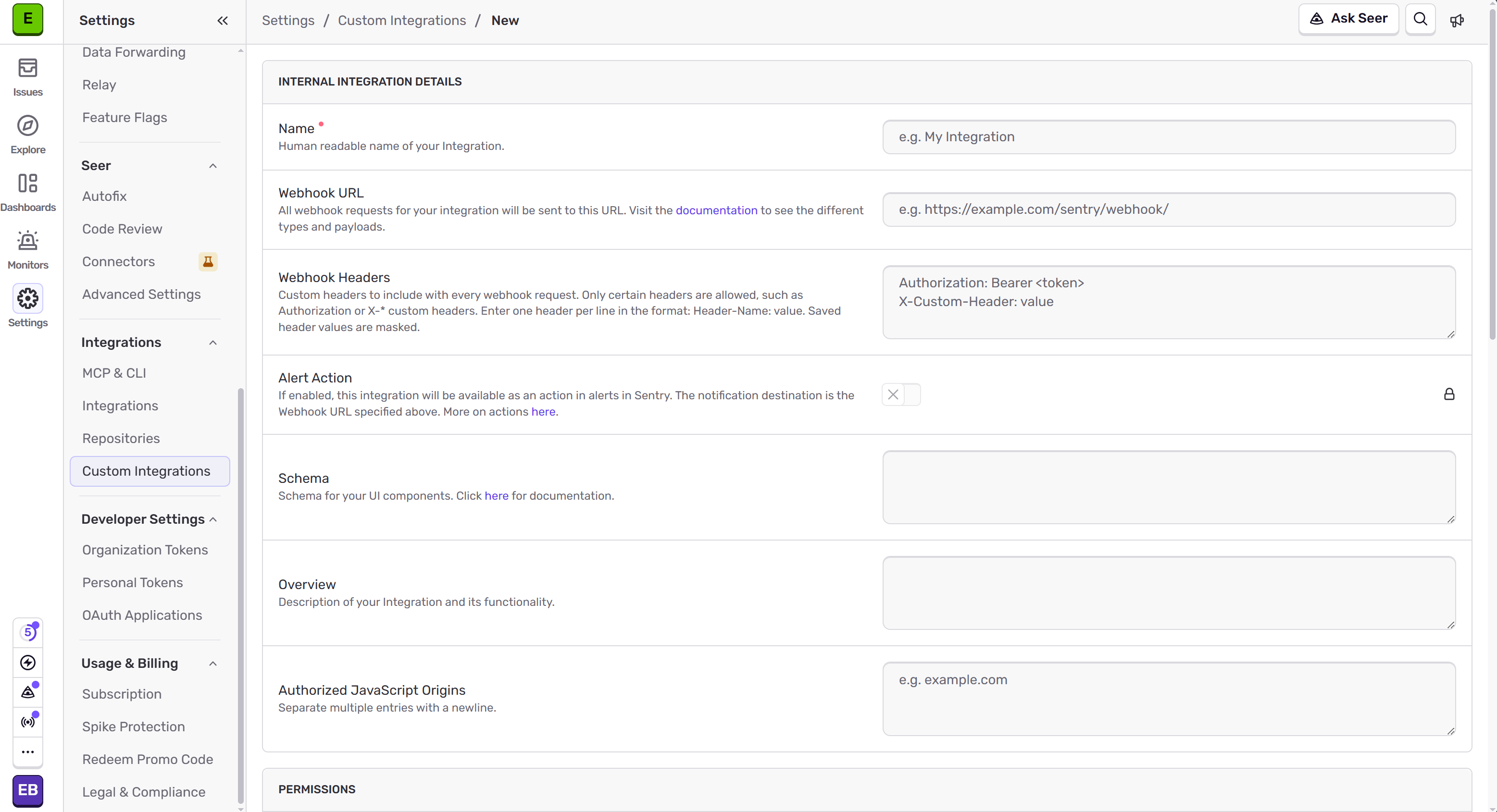
In Sentry, click Settings, and then, under Integrations, click Custom Integrations.
-
Click Create New Integration.
-
Click Getting Started next to Internal Integration.
-
Specify the integration Name, for example, Skyvia.
-
Under Permissions, specify the necessary permissions.
-
Scroll down and click Save Changes.
-
Scroll down and click New Token.
-
Copy the token and store it somewhere securely.
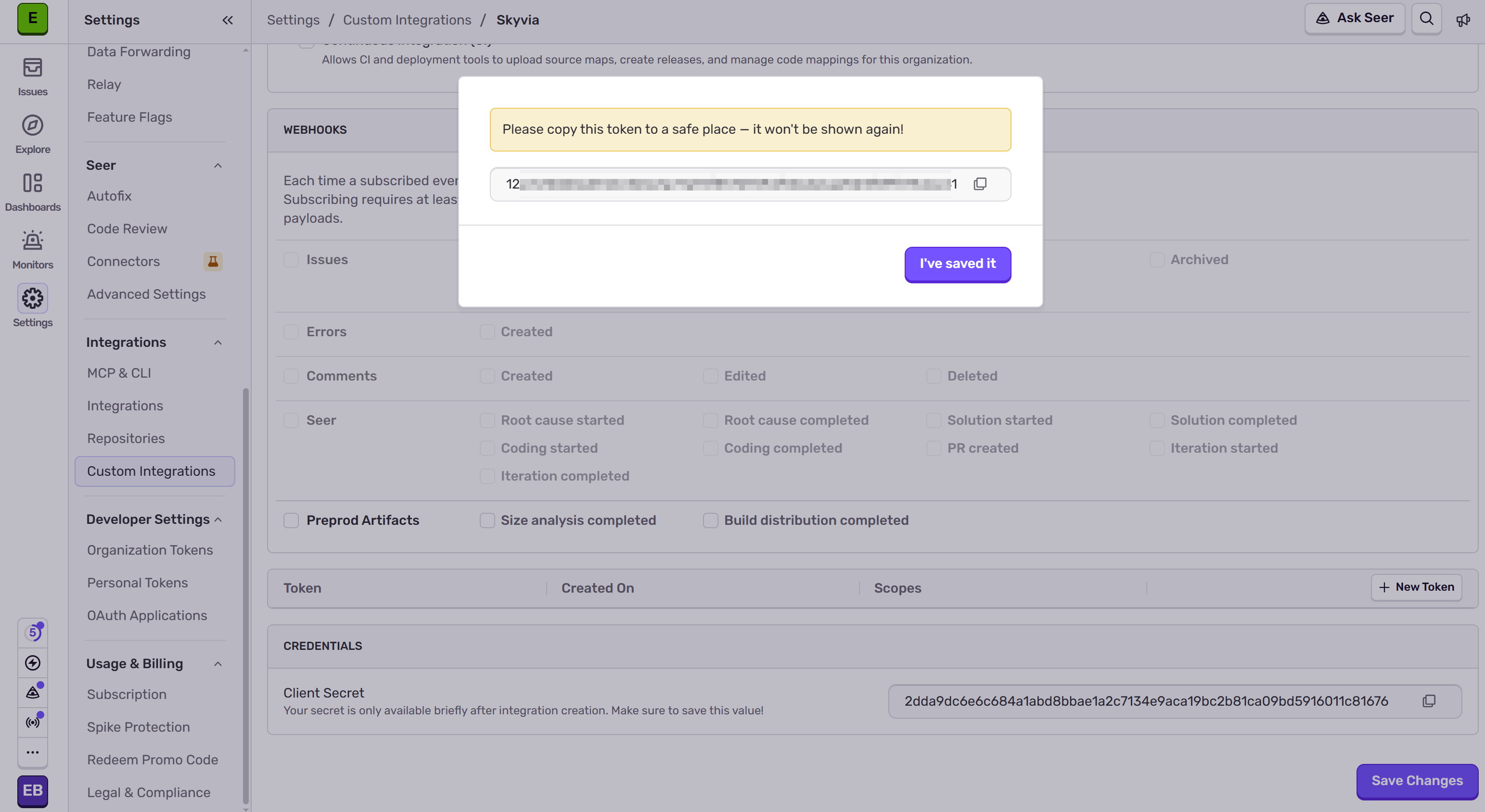
Once you close this dialog, you will no longer be able to see or retrieve the token, but you can create new tokens for existing integrations.
Creating Connection
To create a connection to Sentry, you need to select Connection Mode first:
- Select Cloud if you are connecting to Sentry SaaS.
- Select Direct if your self-hosted Sentry can be connecteinstance address d from theInternet, and you want to connect to it directly from Skyvia.
- Select Agent or Agent with Alias if you want to connect to your self-hosted Sentry via Skyvia Agent. See more information in the Agent Connections topic.
Connecting to Sentry SaaS
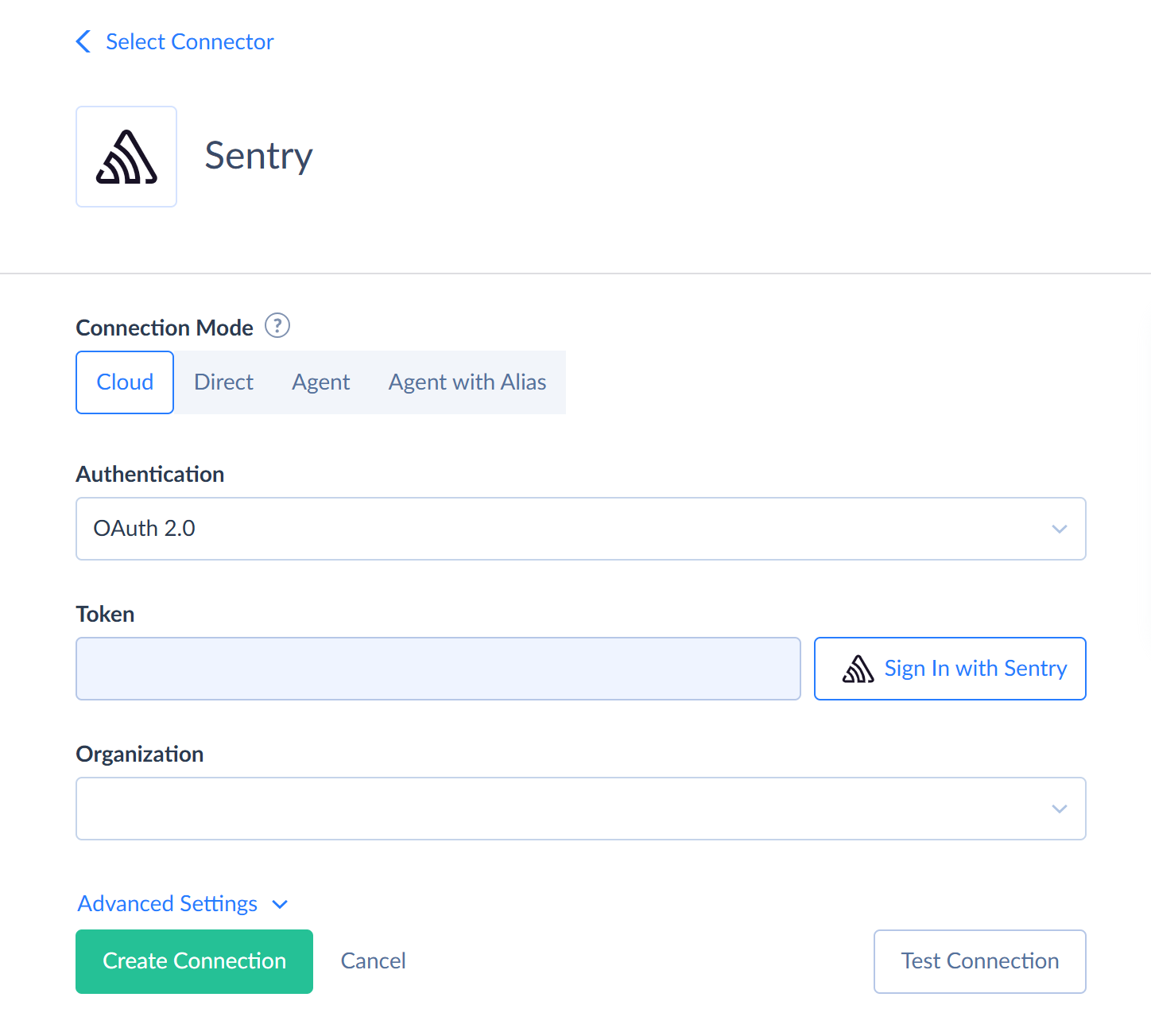
To connect to Sentry SaaS, perform the following steps:
- Under Connection Mode, select Cloud.
- Select Authentication to use: OAuth 2.0 or Auth Token.
- For Auth Token authentication, paste your Token. For OAuth 2.0 authentication, click Sign In with Sentry and sign in to Sentry.
- Select Organization to connect to from the drop-down list.
Connecting to Self-hosted Sentry
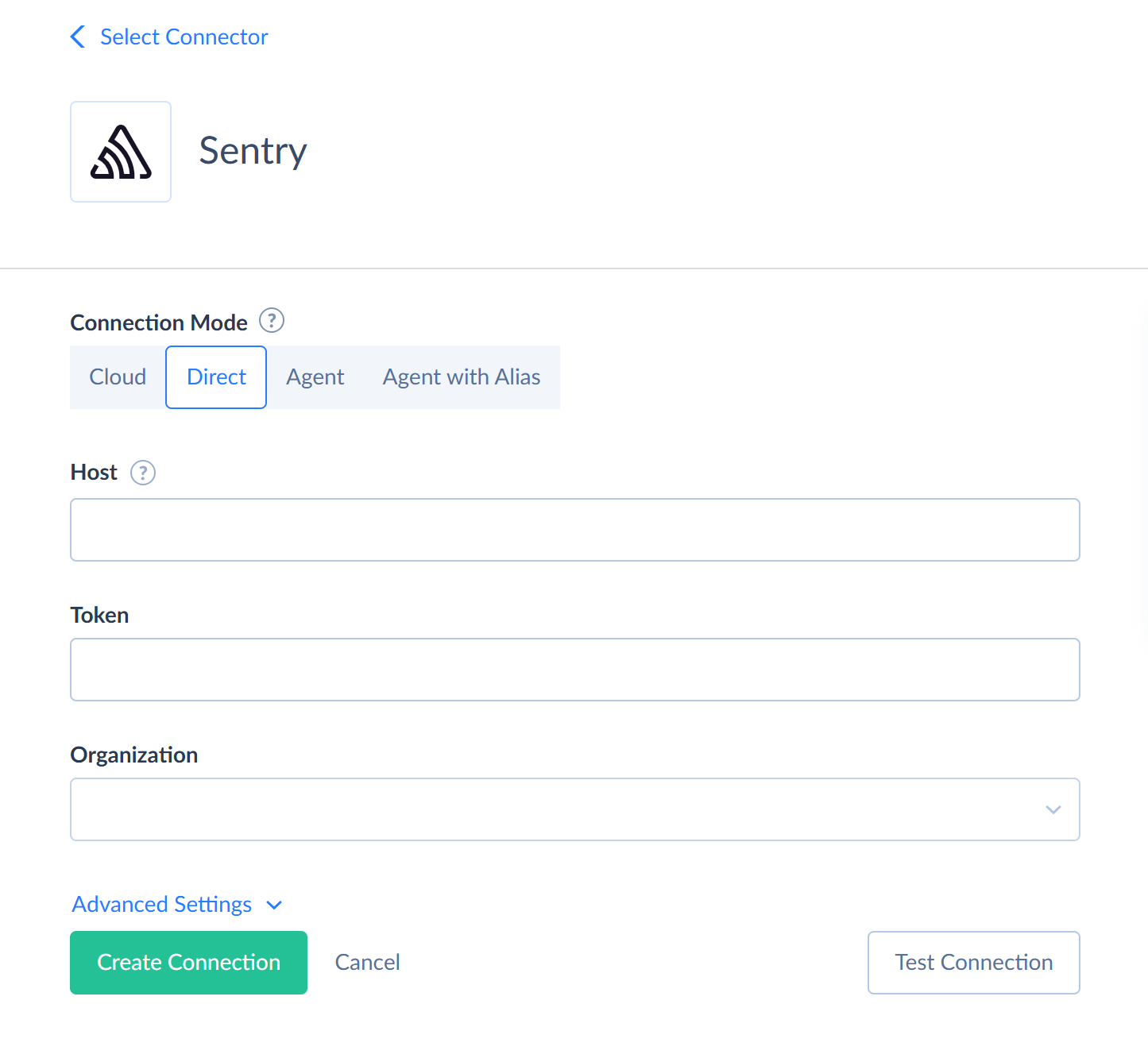
To connect to self-hosted Sentry directly, perform the following steps:
- Under Connection Mode, select Direct.
- Specify your self-hosted Sentry instance address as Host.
- Paste your Token.
- Select Organization to connect to from the drop-down list.
For an Agent connection, you need to specify the same connection parameters and select the Agent to connect to. See more information in the Agent Connections topic.
Additional Connection Parameters
Suppress Extended Requests
For some objects, Sentry API returns only part of the fields when querying multiple records. To query values of lacking fields, Skyvia performs additional extended requests. Such API requests can be performed for each record of such object. However, this can decrease performance and significantly increase the number of API calls used.
The list of additional fields is the following:
| OBJECT | FIELD |
|---|---|
| Members | Teams, TeamRoles, IsOnlyOwner |
| Dashboards | Widgets, Period, StartDate, EndDate, Utc, Expired |
| Issues | FirstReleaseVersion, FirstReleaseDateCreated, LastReleaseVersion, LastReleaseDateCreated, UserReportCount, Tags, Activity, SeenBy, Participants |
| Projects | Status, Color, DefaultEnvironment, IsPublic, IsInternal, IsDynamicallySampled, ResolveAge, DigestsMinDelay, DigestsMaxDelay, SubjectPrefix, SubjectTemplate, DataScrubber, DataScrubberDefaults, ScrubIPAddresses, ScrapeJavaScript, VerifySSL, EnableAutoReleaseCreation, ScmSourceContextEnabled, StoreCrashReports, DebugFilesRole, ProcessingIssues, GroupingConfig, GroupingEnhancements, DerivedGroupingEnhancements, SecondaryGroupingConfig, SecondaryGroupingExpiry, AutofixAutomationTuning, SeerScannerAutomation, RelayPiiConfig, HighlightContext, FingerprintingRules, AllowedDomains, SensitiveFields, SafeFields, BuiltinSymbolSources, HighlightTags, HighlightPreset, DynamicSamplingBiases, Options |
Skyvia also performs additional requests to load the binary content of the Content field in the Dsyms, EventAttachments, and ReleaseFiles objects.
To reduce the number of API calls, you can select the Suppress Extended Requests checkbox. In this case, the fields listed above and the Content fields return empty values.
Connector Specifics
Object Peculiarities
Objects with Parent Objects
Some Sentry objects can be accessed only via their parent objects. For example, to query MemberTeams, OrganizationDailyStats, ProjectMembers, ProjectUsers, ProjectKeys, ProjectTags, ProjectTeams, Environments, Dsyms, ProjectEvents objects, Sentry API requires the id of the corresponding parent object.
Skyvia does not require id of the parent object from the user. If you don't specify the ids of the parent objects, Skyvia will query all parent objects and get their ids. Then, it will query child objects for parent object records. This allows querying child objects without knowing their parents. However, this method takes a lot of time and consumes many API calls. It uses at least one API call for every parent object even if this object does not have any child records.
It is strongly recommended to use filters on the parent object fields when querying data from child objects. This limits the number of parent object records, for which child object data must be queried.
| OBJECT | PARENT OBJECT |
|---|---|
| MemberTeams | Members |
| OrganizationDailyStats, ProjectMembers, ProjectUsers, ProjectKeys, ProjectTags, ProjectTeams, Environments, Dsyms, ProjectEvents | Projects |
| DashboardWidgets | Dashboards |
| ProjectTagValues | ProjectTags |
| IssueTagValues, IssueHashes, IssueEvents | Issues |
| TeamMembers, TeamProjects | Teams |
| EventAttachments | ProjectEvents |
| ReleaseFiles, ReleaseDeploys, ReleaseCommits | Releases |
| RepositoryCommits | Repos |
| MonitorCheckins | Monitors |
ProjectEvents and IssueEvents
Sentry returns events in two forms: a short form with 100 records per page, and a full form with 10 records per page. Skyvia requests the full form if you query at least one of the following fields: EventType, Size, Dist, DateReceived, SdkName, SdkVersion, Contexts, Packages, Errors, Fingerprints, Context, Occurrence, GroupingConfigId, GroupingConfigEnhancements, Entries.
The full form requires significantly more API calls. To reduce the number of API calls, don't query these fields if you don't need them.
Objects with Binary Content
The Dsyms, EventAttachments, and ReleaseFiles objects store binary content in the Content field. Skyvia downloads the content with a separate request for each record, so reading these objects may take a long time.
The FileName field in these objects is calculated. Skyvia builds it from the following fields:
| OBJECT | FILENAME SOURCE |
|---|---|
| Dsyms | DebugId and the extension, based on SymbolType |
| EventAttachments | Name and the extension, based on MimeType |
| ReleaseFiles | Name and the extension, based on ContentType |
If the name already has an extension, Skyvia does not add it again.
ReleaseFiles
When inserting records into the ReleaseFiles object, the ReleaseVersion, Name, and Content fields are required. Additionally, you must specify the content type either by including the extension in the Name field value or by specifying the ContentType field value. Otherwise, Skyvia returns an error.
The file size must not exceed 38 MB.
Dsyms
The Dsyms object stores debug information files, which Sentry uses to make stack traces readable. This object supports only reading and deleting records. To upload debug information files, use the UploadDebugFiles stored procedure.
Teams
When inserting records into the Teams object, you must specify at least one of the Name or Slug fields. If you specify only Name, Sentry generates the Slug value from it automatically.
Tags
Sentry doesn't return the full list of organization tags. It returns only the most frequent tags. To get more tags, Skyvia performs a request for the entire history and seven more requests for two-week periods over the last 98 days, and merges the results. However, rare tags may still be missing from the results.
OrganizationDailyStats and ReleaseHealthSessionsDailyStats
These objects store aggregated statistics. Sentry returns them grouped by the combination of values of the queried fields, and limits the size of the response. If the response exceeds this limit, Sentry omits some groups without notification. To reduce the risk of losing data, Skyvia splits the period into 30-day windows and performs a separate request for each window.
The set of queried fields determines the data grouping. Thus, the same period may return a different number of records and different metric values, depending on the queried fields. The fewer fields you query, the lower the risk of losing groups.
Skyvia reads the OrganizationDailyStats data for the last 180 days (six requests) and the ReleaseHealthSessionsDailyStats data for the last 90 days (three requests). Filter by the Date field to reduce the number of requests.
ExploreLogs, ExploreSpans, and ExploreTraceMetrics
Skyvia reads the data of these objects for the last 30 days. Filters by date don't extend this period. If you query records older than 30 days, they are not returned.
Sentry accepts no more than 50 fields per request. If you query more fields, Skyvia splits reading into multiple requests. Thus, querying all fields of these objects may require several times more API calls than querying only the needed fields. The set of fields in these objects depends on the attributes that your projects send to Sentry.
If your organization has a lot of data, Sentry may return a sample instead of the full result. In this case, Skyvia returns an error. To avoid this, filter data by the Timestamp field and read it in smaller parts.
ExploreErrors
Skyvia reads the ExploreErrors data for the entire available history. If you query a large amount of data, the request may time out. In this case, filter data by date and read it in smaller parts.
IssueTagValues
The IssueTagValues object stores the tag values of issue events and the number of events with each value. Sentry returns only the 100 most frequent values for each tag. If there are more values, Skyvia performs an additional request for each such tag. Thus, reading this object may take a long time.
Filtering Specifics
Sentry supports the following native filters:
| Object | Operator | Field |
|---|---|---|
| Teams | = |
Id, Slug |
| Members | = |
Id, Email, OrgRole, Pending, UserHas2fa, SsoLinked |
| MemberTeams | = |
MemberId |
| OrganizationDailyStats | = |
ProjectId |
=, >, >=, <, <= |
Date | |
| Detectors | = |
Id, ProjectId, Enabled |
=, !=, IN |
Type | |
=, !=, LIKE |
Name | |
| Workflows | = |
Id |
=, !=, LIKE |
Name | |
| DiscoverSavedQueries | = |
Id |
LIKE |
Name | |
| Dashboards | = |
Id, IsFavorited |
IS NULL, IS NOT NULL |
PrebuiltId | |
| DashboardWidgets | = |
DashboardId |
| ProjectMembers, OrganizationProjectKeys, ProjectTags, ProjectTagValues, ProjectTeams | = |
ProjectId |
| ProjectUsers | = |
ProjectId, Identifier, Email, Username, IpAddress |
| ProjectKeys | = |
Id, ProjectId |
| ReleaseHealthSessionsDailyStats | = |
ProjectId, Environment |
=, >, >=, <, <= |
Date | |
| IssueTagValues | = |
IssueId, Key |
| Replays | = |
Id, ProjectId, Environment |
| IssueHashes | = |
IssueId |
| TeamMembers, TeamProjects | = |
TeamId |
| Projects | = |
Id |
| Issues | =, IN |
Id |
=, != |
Status | |
=, !=, LIKE |
Title, Culprit | |
=, !=, IN |
Substatus, Priority, IssueCategory | |
=, !=, IN, IS NULL, IS NOT NULL |
Level | |
=, !=, IN, IS NULL, IS NOT NULL, LIKE |
Platform | |
=, !=, IS NULL, IS NOT NULL, LIKE |
Logger | |
=, >, >=, <, <=, IN |
EventCount, UserCount | |
=, >, >=, <, <= |
CreatedDate, UpdatedDate | |
| UserFeedback | = |
AssignedToEmail |
=, IN |
Id | |
=, != |
Status | |
=, !=, IN |
Substatus, Priority | |
=, !=, IN, IS NULL, IS NOT NULL |
Level | |
IS NULL, IS NOT NULL |
AssignedToId | |
=, >, >=, <, <= |
CreatedDate, UpdatedDate | |
| Environments | = |
Name, ProjectId |
| Dsyms | = |
ProjectId, DebugId, CodeId |
| ProjectEvents | = |
Id, ProjectId |
=, >, >=, <, <= |
CreatedDate | |
| IssueEvents | = |
Id, IssueId |
=, >, >=, <, <= |
CreatedDate | |
| EventAttachments | = |
Id, ProjectId, EventId |
LIKE |
Name | |
| Releases | = |
Status |
=, LIKE |
Version | |
=, >, >=, <, <= |
CreatedDate | |
| ReleaseFiles | = |
Id, ReleaseVersion, Sha1 |
LIKE |
Name | |
| ReleaseDeploys, ReleaseCommits | = |
ReleaseVersion |
| Repos | = |
Id, Status, IntegrationId |
LIKE |
Name | |
| RepositoryCommits | = |
RepoId |
| Monitors | = |
Id, ProjectId, OwnerId |
| MonitorCheckins | = |
MonitorId |
| ExploreLogs | =, != |
Id, TraceId, SpanId |
=, !=, IN |
Severity, ProjectSlug | |
=, !=, IN, LIKE |
Message, Environment, Release, Transaction | |
=, >, >=, <, <=, IN |
SeverityNumber | |
=, >, >=, <, <= |
Timestamp | |
| ExploreSpans | =, != |
Id, TraceId, ParentSpanId, IsTransaction, TransactionSpanId, TransactionEventId, Group, ProfileId, ReplayId |
=, !=, IN |
Status, ProjectSlug | |
=, !=, IN, LIKE |
TransactionName, Operation, Name, Description, Category, Action, Domain, Environment, Release, Platform, Origin, UserId, UserEmail, UserUsername, UserIp, SdkName, SdkVersion | |
=, >, >=, <, <=, IN |
Duration, SelfTime, PreciseStartTimestamp, PreciseFinishTimestamp, ReceivedTimestamp | |
=, >, >=, <, <= |
Timestamp | |
| ExploreTraceMetrics | =, != |
Id, TraceId, ParentSpanId, ReplayId |
=, !=, IN |
ProjectSlug | |
=, !=, IN, LIKE |
MetricName, MetricType, MetricUnit, TransactionName, Environment, Release, Origin, BrowserName, BrowserVersion, SdkName, SdkVersion | |
=, >, >=, <, <=, IN |
Value, PreciseTimestamp | |
=, >, >=, <, <= |
Timestamp | |
| ExploreErrors | =, != |
Id, IsHandled, IsMainThread, IsSymbolicatedInApp, TraceId, SpanId, TraceSampled, ReplayId, ProfilerId |
=, !=, IN |
ProjectSlug | |
=, !=, IN, LIKE |
Title, Message, Culprit, Location, EventType, Platform, TransactionName, Environment, Release, Dist, ErrorTypes, ErrorValues, ErrorMechanisms, UserId, UserEmail, UserUsername, UserIp, GeoCountryCode, GeoRegion, GeoCity, GeoSubdivision, SdkName, SdkVersion, HttpMethod, HttpUrl, HttpReferer, HttpStatusCode | |
=, >, >=, <, <=, IN |
IssueId | |
=, >, >=, <, <= |
Timestamp, ReceivedDate |
The ExploreLogs, ExploreSpans, ExploreTraceMetrics, and ExploreErrors objects also support native filters by the fields based on the attributes detected in your organization.
Native filters can be combined only with the AND operator. Skyvia processes other filters locally.
LIKE Operator
The native support of the LIKE operator depends on the field:
- For the Detectors.Name, Workflows.Name, Issues.Title, Issues.Culprit, Issues.Platform, Issues.Logger fields, and the text fields of the ExploreLogs, ExploreSpans, ExploreTraceMetrics, and ExploreErrors objects, the
%wildcard is supported only at the start or end of the pattern:abc%,%abc,%abc%. - For the DiscoverSavedQueries.Name, EventAttachments.Name, Releases.Version, ReleaseFiles.Name, Repos.Name fields, only the
%abc%pattern is supported natively.
Skyvia processes patterns with % in the middle or with _ locally.
Nested Objects
The following fields store complex structured data in JSON format.
| Object | Field |
|---|---|
| Organizations | Access, SensitiveFields, SafeFields, DefaultCodeReviewTriggers, ReplayAccessMembers, AvailableRoles, OrgRoleList, TeamRoleList, OnboardingTasks |
| Teams | Access |
| Members | Teams, TeamRoles |
| Detectors | WorkflowIds, ConditionGroupConditions, DataSources |
| Workflows | DetectorIds, TriggersConditions, ActionFilters |
| DiscoverSavedQueries | Fields, Projects, Environment, YAxis, Widths |
| Dashboards | Projects, Environment, Widgets |
| DashboardWidgets | Queries |
| Replays | Urls, Releases, SegmentNames, TraceIds, ErrorIds, WarningIds, InfoIds, Clicks |
| Projects | Teams, Access, Platforms, Features, AllowedDomains, SensitiveFields, SafeFields, BuiltinSymbolSources, HighlightTags |
| Issues | Annotations, Tags, Activity, SeenBy, Participants |
| ProjectEvents, IssueEvents | Tags, Fingerprints, Entries |
| Releases | Projects, Authors |
| ReleaseCommits, RepositoryCommits | Releases |
| Monitors | Environments |
You can use our Nested Objects mapping feature in the Import and Data Flow integrations to insert or update the nested values in such fields. You can replicate these objects into databases or data warehouses using our new replication runtime. For this, select the Use New Replication Runtime in the Replication, enable the Unwind Nested Objects and select Separate Tables.
Incremental Replication and Synchronization
Incremental Replication is supported for the following objects: Organizations, Teams, Members, OrganizationDailyStats, Detectors, Workflows, DiscoverSavedQueries, Dashboards, DashboardWidgets, ProjectMembers, ProjectUsers, ProjectKeys, OrganizationProjectKeys, ReleaseHealthSessionsDailyStats, ProjectTagValues, IssueTagValues, Replays, TeamMembers, TeamProjects, ProjectTeams, Projects, Issues, UserFeedback, Dsyms, ProjectEvents, IssueEvents, EventAttachments, Releases, ReleaseFiles, ReleaseCommits, Repos, RepositoryCommits, Monitors, MonitorCheckins.
The Detectors, Workflows, DiscoverSavedQueries, ProjectTagValues, IssueTagValues, Replays, Issues, and UserFeedback objects have both the CreatedDate and UpdatedDate fields. Other objects have only the CreatedDate field and do not have the UpdatedDate. It means that the Incremental Replication detects only the new records for these objects.
For objects that don't support native filtering by date, Incremental Replication reads all the object records and selects the changed records locally.
The OrganizationDailyStats and ReleaseHealthSessionsDailyStats objects support Incremental Replication by the Date field. Since Sentry continues calculating statistics until the end of the day, the record for the current day may be incomplete in the target. Skyvia reads these objects only for the last 180 and 90 days respectively, so you cannot accumulate a longer history by repeating replication.
Synchronization is supported for the following objects: Teams, Members, Workflows, DiscoverSavedQueries, Dashboards, ProjectKeys, Projects, Releases, Monitors.
DML Operations Support
Skyvia supports the following DML operations for Sentry objects:
| Operation | Objects |
|---|---|
| INSERT, UPDATE, DELETE | Dashboards, DiscoverSavedQueries, Members, Monitors, ProjectKeys, Projects, Releases, Teams, Workflows |
| INSERT, DELETE | MemberTeams, ProjectTeams, ReleaseFiles |
| UPDATE, DELETE | Detectors, Issues, UserFeedback |
| INSERT | ReleaseDeploys |
| UPDATE | Environments |
| DELETE | Dsyms, EventAttachments, Replays |
Sentry requires passing some fields together with the updated fields, even if their values don't change. If you don't specify these fields in the UPDATE operation, Skyvia queries their current values with an additional request before updating a record.
| OBJECT | FIELD |
|---|---|
| Members | TeamRoles |
| Detectors | ConditionGroupConditions |
| Workflows | Name, Enabled, TriggersConditions |
| DiscoverSavedQueries | Name, Query, QueryDataset, Fields, Projects, Environment, YAxis, Widths, Display, OrderBy, Interval, TopEvents, Range, StartDate, EndDate |
| ProjectKeys | RateLimitCount |
Stored Procedures
Skyvia represents part of the supported Sentry features as stored procedures. You can call a stored procedure, for example, as a text of the command in the ExecuteCommand action in a Target component of a Data Flow or in Query.
GetIssueEvents
To get the list of events of an issue, use the command
call GetIssueEvents(:IssueId)
InviteMember
To invite a member to the organization, use the command
call InviteMember(:Email,:OrgRole,:Teams,:SendInvite)
| PARAMETER NAME | DESCRIPTION |
|---|---|
| Required. Email of the user to invite. | |
| OrgRole | Optional. Organization role of the member. |
| Teams | Optional. Comma-separated list of team slugs, for example, 'team01,team02'. |
| SendInvite | Optional. Determines whether to send an invitation email. |
UploadDebugFiles
To upload debug information files to a project, use the command
call UploadDebugFiles(:ProjectId,:Content)
| PARAMETER NAME | DESCRIPTION |
|---|---|
| ProjectId | Required. Identifier of the project. |
| Content | Required. Binary content of a ZIP archive with debug information files. |
Supported Actions
Skyvia supports all the common actions and the following custom actions for Sentry: